

OfficeSuite Pro + PDF
Business




عن هذا التطبيق
• The most downloaded office app on Google Play
• Delivers the most exclusive features over any other office app
• Installed on 200 million devices in 195 countries and growing
Preloaded by top manufacturers including Sony, Amazon, Acer, Alcatel, Toshiba, Sharp, Kyocera and more.
GOOGLE PLAY EDITORS’ CHOICE
INFOWORLD'S TOP MOBILE OFFICE
LIFEHACKER'S BEST ANDROID OFFICE APP
PCMAG EDITORS’ CHOICE AWARD
KEY FEATURES:
•View, create and edit complex office documents using a familiar desktop-style interface
•Full compatibility with Microsoft formats including DOC, DOCX, DOCM, XLS, XLSX, XLSM, PPT, PPTX, PPS, PPSX, PPTM, PPSM
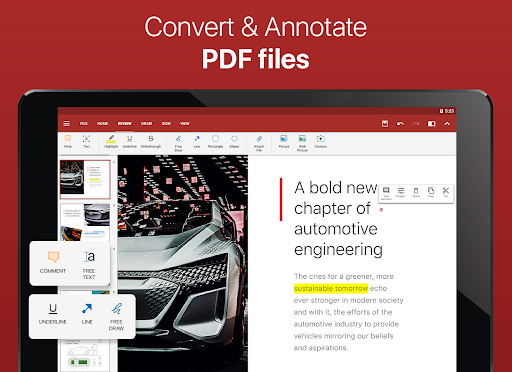
•Support for PDF files including PDF camera scanning, Export to PDF and Fillable forms
•Additional support for common formats like RTF, TXT, LOG, CSV, EML, ZIP; (Open Office - ODT, ODS and ODP - support available as in-app purchase)
•Integrated with File Commander for advanced synchronization and quick and easy access to both local and remote files
•MobiSystems Drive - you can now store up to 15.0 GB of documents in the cloud
•NEW! OfficeSuite Chats – Chat and exchange documents with your friends and colleagues
•Integrated spell checker - Available in more than 40 languages the spell checker guarantees that your work in Documents, Slides and Sheets is impeccably written
•Sharing via cloud services like OfficeSuite Drive, Box, DropBox, Google Drive, OneDrive, as well as over email and Bluetooth
•PDF security and editing features including digital signatures support, permissions management, text to PDF, and annotations
•Text-to-Speech support for documents and PDFs
•View documents the way they're meant to be seen with the Japanese, Extended and Extended & Japanese Font Pack (available as an add-on)
•Create a profile and sync your settings across all your Android, iOS and Windows Desktop (OfficeSuite Personal license) devices
•Chromecast dual screen support
•Available in 56 languages
THE LATEST OFFICESUITE IS SPECIALLY DESIGNED AROUND ANDROID Q AND ALSO INCLUDES:
•NEW! With OfficeSuite Chats you can easily send documents, collaborate with colleagues or simply chat with your friends on the go
•NEW! Sign into OfficeSuite Now using a phone number
•Convert and open files created with Apple Pages, Numbers, or Keynote apps
•Open multiple documents and work on two documents simultaneously using split-screen mode with drag-and-drop support (Android 7 and up)
•Open documents or create new ones faster than ever with the new Quick access notification drawer
•With the enhanced mouse support for Chromebooks users can now work faster and easier than ever
•Choose between beautiful new themes to create great presentations
•Protect individual sheets and cells in Spreadsheets for extra security
•Cast presentations across multiple devices on the same network with Share Cast
•Use Quick Sign to easily sign a PDF using your digital signature
HOW IS OFFICESUITE PRO BETTER THAN OFFICESUITE FREE?
• Security features - work with password protected files
• Format Painter in Word documents
• Track changes with multiple author support
• Insert pictures using your camera or from an external file
• Additional options in Excel including Insert Filter, Conditional Formatting, Define Name, Import Image, Edit Chart, and Save as CSV
• Interactive form support for PDFs: checkboxes, radio buttons, text fields, etc.
• Legacy Microsoft document formats support (.DOC, .XLS, .PPT) along with .ODF formats
OfficeSuite granted permissions- http://www.mobisystems.com/android_office/full-features.html#permissions
معلومات التطبيق
ما الجديد
Optimized for Android 14: Seamlessly enjoy our app on the newest Android platform.
Effortless File Sync: Access recent and favorite files across devices with MobiSystems account sync.
Enhanced Asian Language Support: Edit documents in traditional Asian languages with improved visualization.
Fully Compliant with Google's Consent Management Platform: Your privacy and data control are our priorities.
أذونات التطبيق
-
Photos/Media/Files
- read the contents of your USB storage
- modify or delete the contents of your USB storage
-
Storage
- read the contents of your USB storage
- modify or delete the contents of your USB storage
-
Wi-Fi connection information
- view Wi-Fi connections
-
Other
- manage document storage
- receive data from Internet
- view network connections
- create accounts and set passwords
- full network access
- control Near Field Communication
- run at startup
- reorder running apps
- control vibration
- prevent device from sleeping
- add words to user-defined dictionary
- install shortcuts


التقييمات والمراجعات
the Only Excel AppAmong Several and several tried ones, On Android that opened a huge Excell File
Apdolutely unusable on tablet with "long press to copy" feature always turned on and no way to turn it off. While holding tablet with hands God forbid you must touch the screen and it always turns all red making pdf reading impossible. I have written the request for this feature to be removed or beeing able to be turned off but dev team just dont care. I dont know who made this feature even there but its stupid. srsly change it! Imagine the car that only breaks when you touch steering wheel.
I have been having problems with Excel for at least 3 years with hyperlink issues. If several cells within a column range have hyperlinks, and I delete a row within the column range, hyperlinks within the embedded hyperlinks move to another cell within that range . I’ve escalated several tickets, no resolution. It’s been at least 3 years and still have the same problem. I have submitted several requests for an update on this issue and I do not get any answer back.
I'm not sure I've used it enough to make a valid judgement but as far as I can tell this app is pretty good. It does what it says it will and I have not had any problems with it so far. I may come back and amend my comments later but for now I think it's pretty good. OK, I've used it more now and find it to be a very capable suite of apps. Thus far I have had no problems with it at all.
I rated this 5 stars in 2018 and it's still 5 stars in 2026. Very easy to load a file and change it and then save on my personal NAS cloud drive.
very very good


