

GoodLuck Relay ZKin Watch
Personalization
0.0
31 التحميلات
"The Watch supports running on Wear OS"
التثبيت على Google Play
تطبيق مدفوع



عن هذا التطبيق
The Watch supports running on Wear OS
🎁Coupon Link :
https://www.facesapps.com/brand/327
🎁Add Telegram group to obtain remaining coupons :
https://t.me/zkinwatch
🏠Other my works here:
https://play.google.com/store/apps/dev?id=9082617204511160070
⌚️Instagram :
https://www.instagram.com/zkinwatchfaces?igsh=OHNuOHExbGliYWtm
⌚️Facebook :
https://www.facebook.com/share/1YFxgRMiqf/
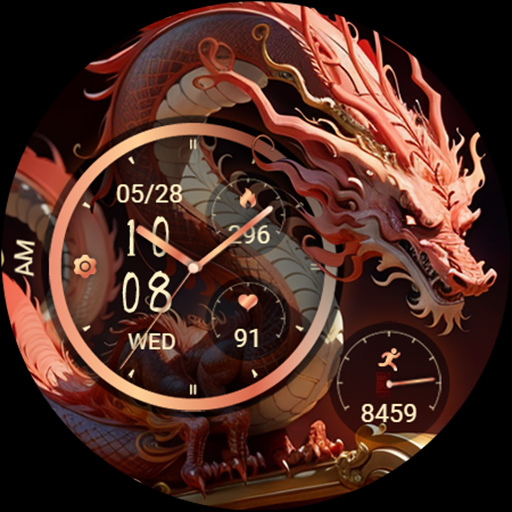
1. On the left: morning and afternoon, settings, date, time, week
2. Middle: Calories, heart rate
3. On the right: Pointer to the number of steps and the target percentage of steps
Compatible with devices: Pixel Watch, Galaxy Watch 4, Galaxy Watch 5, Galaxy Watch 6 and other devices
How do I install the watch face on WearOS ?
1. Install it from Google Play Wear Store on your watch
2. Install the companion app for fully customization (Android phone devices)
If your device prompts "Please check your watch", the solution is as follows:
Method 1: Install on the watch end: Long press the watch to switch dial status/slide to the far right to add a dial/slide to the far bottom to find the purchased dial, click to set it
Method 2: Install on the mobile phone: Open Samsung Smart Wearable/Watch/Slide to the bottom of the downloaded list/Left slide to find the downloaded watch, click on Install to proceed
If heart rate is not displayed, please operate on the watch: Settings/Application/Health Platform/Samsung Health/Health Platform (Start)/Heart Rate (Enable)/Finis
🎁Coupon Link :
https://www.facesapps.com/brand/327
🎁Add Telegram group to obtain remaining coupons :
https://t.me/zkinwatch
🏠Other my works here:
https://play.google.com/store/apps/dev?id=9082617204511160070
⌚️Instagram :
https://www.instagram.com/zkinwatchfaces?igsh=OHNuOHExbGliYWtm
⌚️Facebook :
https://www.facebook.com/share/1YFxgRMiqf/
1. On the left: morning and afternoon, settings, date, time, week
2. Middle: Calories, heart rate
3. On the right: Pointer to the number of steps and the target percentage of steps
Compatible with devices: Pixel Watch, Galaxy Watch 4, Galaxy Watch 5, Galaxy Watch 6 and other devices
How do I install the watch face on WearOS ?
1. Install it from Google Play Wear Store on your watch
2. Install the companion app for fully customization (Android phone devices)
If your device prompts "Please check your watch", the solution is as follows:
Method 1: Install on the watch end: Long press the watch to switch dial status/slide to the far right to add a dial/slide to the far bottom to find the purchased dial, click to set it
Method 2: Install on the mobile phone: Open Samsung Smart Wearable/Watch/Slide to the bottom of the downloaded list/Left slide to find the downloaded watch, click on Install to proceed
If heart rate is not displayed, please operate on the watch: Settings/Application/Health Platform/Samsung Health/Health Platform (Start)/Heart Rate (Enable)/Finis
معلومات التطبيق
إصدار
تم التحديث في
Sep 23, 2026
الحجم
يتطلب أندرويد
معرف الحزمة
com.watchfacestudio.GoodLuckRelay
مثبت
31
الفئة
Personalization
ما الجديد
Release a new watch companion to help quickly install watch faces on mobile devices


