

CELEST5494 Artistic Watch
Personalization
0.0
1.2K+ التحميلات
"Digital dog watch face with 10 breed portraits & 12 accent color options."
التثبيت على Google Play
تطبيق مدفوع


عن هذا التطبيق
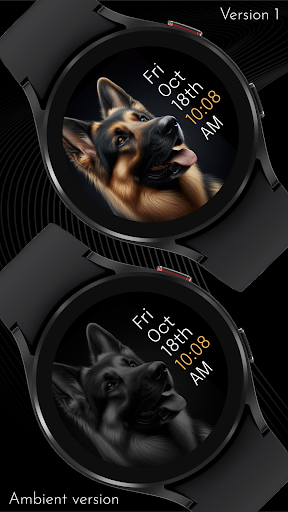
Digital, with a dog looking back at you: CELEST5494 Artistic Watch fills the dial with a portrait of a well-known breed and keeps the time in clean text off to one side.
The portrait runs edge to edge against black, close enough that the coat and the eyes carry real detail. Weekday, month, date, time, and the AM/PM marker stack vertically beside it, plain and easy to read, with the time itself picked out in your chosen accent color. Ten breeds are included, so you can wear the one you actually own, and twelve accent colors let you tune the text to the portrait or to whatever you are wearing.
🐕 Features
- Digital dial built around a full-bleed dog portrait
- Weekday, month, and date stacked beside the time
- Time in a contrasting accent color with AM/PM marker
- Ten dog breeds to choose from
🎨 Customization
- 10 background image variations of different dog breeds
- 12 accent color variations
- 5 dimming levels for the background image, from 50% to 100%
✅ Compatible Devices
- Google Pixel Watch/2/3/4/5
- OnePlus Watch 2/2R/3/4
- Oppo Watch X2/X3
- Samsung Galaxy Watch 4/4 Classic/5/5 Pro/6/6 Classic/7/8/8 Classic/9/FE/Ultra (2024)/(2025)/Ultra 2
- Xiaomi Watch 2/2 Pro/5
🎁 BOGO Promotion: https://celest-watches.com/bogo/
✨ Explore the complete CELEST collection in one place — including all Wear OS, HUAWEI, and Apple Watch faces, along with our apps and tools — with the CELEST Catalog app: https://play.google.com/store/apps/details?id=com.celestwatches.catalog
🔧 Installation Help
Having trouble? We've got you covered:
- Use the dropdown menu next to "Install" on your phone to select your watch model or install directly from your watch's Play Store app.
- Updating weather data (if the watch face shows weather) may take time after installation but switching to another watch face and switching back or restarting both the watch and phone usually helps.
- Check out our installation and troubleshooting guide: https://celest-watches.com/installation-troubleshooting/
- Contact us at [email protected] for quick support
📞 Support & Community
📧 Support: [email protected]
📱 Follow @celestwatches on Instagram and subscribe to our newsletter to get notified of new releases and deals: https://celest-watches.com/newsletter/
The portrait runs edge to edge against black, close enough that the coat and the eyes carry real detail. Weekday, month, date, time, and the AM/PM marker stack vertically beside it, plain and easy to read, with the time itself picked out in your chosen accent color. Ten breeds are included, so you can wear the one you actually own, and twelve accent colors let you tune the text to the portrait or to whatever you are wearing.
🐕 Features
- Digital dial built around a full-bleed dog portrait
- Weekday, month, and date stacked beside the time
- Time in a contrasting accent color with AM/PM marker
- Ten dog breeds to choose from
🎨 Customization
- 10 background image variations of different dog breeds
- 12 accent color variations
- 5 dimming levels for the background image, from 50% to 100%
✅ Compatible Devices
- Google Pixel Watch/2/3/4/5
- OnePlus Watch 2/2R/3/4
- Oppo Watch X2/X3
- Samsung Galaxy Watch 4/4 Classic/5/5 Pro/6/6 Classic/7/8/8 Classic/9/FE/Ultra (2024)/(2025)/Ultra 2
- Xiaomi Watch 2/2 Pro/5
🎁 BOGO Promotion: https://celest-watches.com/bogo/
✨ Explore the complete CELEST collection in one place — including all Wear OS, HUAWEI, and Apple Watch faces, along with our apps and tools — with the CELEST Catalog app: https://play.google.com/store/apps/details?id=com.celestwatches.catalog
🔧 Installation Help
Having trouble? We've got you covered:
- Use the dropdown menu next to "Install" on your phone to select your watch model or install directly from your watch's Play Store app.
- Updating weather data (if the watch face shows weather) may take time after installation but switching to another watch face and switching back or restarting both the watch and phone usually helps.
- Check out our installation and troubleshooting guide: https://celest-watches.com/installation-troubleshooting/
- Contact us at [email protected] for quick support
📞 Support & Community
📧 Support: [email protected]
📱 Follow @celestwatches on Instagram and subscribe to our newsletter to get notified of new releases and deals: https://celest-watches.com/newsletter/
معلومات التطبيق
إصدار
تم التحديث في
Aug 05, 2026
الحجم
يتطلب أندرويد
معرف الحزمة
com.watchfacestudio.celest5494
مثبت
1.2K+
الفئة
Personalization
ما الجديد
Updated to target Android 16 (API 36).
أذونات التطبيق
-
Other
- view network connections
- full network access

التقييمات والمراجعات
0.0
إجمالي التقييمات
5
4
3
2
1
L
Luka
Dec 01, 2024
Love this looks so good can't decide which woof to use.
C
C. S.
Jun 26, 2024
Very cute! Would love if you add a husky.


