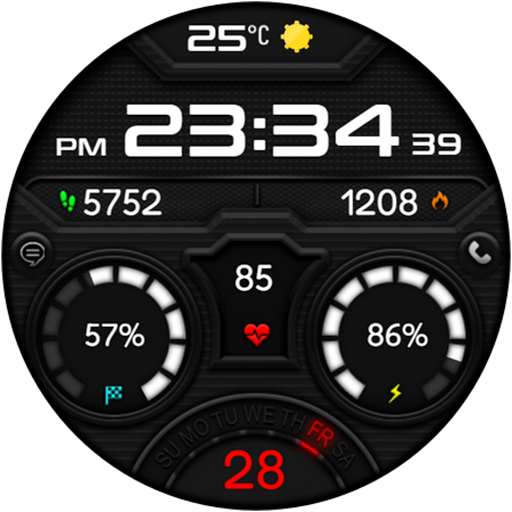
RE65 - Digital LCD Sports
Personalization
4.6
3.9K+ Downloads
"Sport & Health Tracking customizable Watch Face for Wear OS"
Auf Google Play installieren
Kostenpflichtige App


Über diese App
A modern watch face with multiple customizable data fields and colors, inspired by a LCD screen. Health Tracking & Informative Face
Powered by Watch Face Format
⚙️ Phone App Features
The phone app is simply a tool to facilitate installation and locating the watch face on your Wear OS watch. Only the mobile app contains ads.
⚙️ Watch Face Features
• Hour Format Synced With Device (12/24h)
• Date
• 5 Customizable Complications
• Battery Indicator
• Steps Progress Indicator
• 2x Customizable Shortcuts
• Multiple Color Variations
• Always On Display Mode
🎨 Customization
1 - Touch and hold display
2 - Tap on Customize option
🎨 Complications
Touch and hold display to open customization mode. You can customize the field with any data you want.
🔋 Battery
For better battery performance of the watch, we recommend disabling the "Always On Display" mode.
✅ Compatible devices include Google Pixel, Galaxy Watch 4, 5, 6, 7, 8 and other Wear OS models.
Installation and troubleshooting
Follow this link: https://www.recreative-watch.com/help/#installation-methodes
Watch faces don't automatically apply on your watch screen after the installation. That's why you must set it on your watch's screen.
💌 Write to [email protected] for assistance.
Powered by Watch Face Format
⚙️ Phone App Features
The phone app is simply a tool to facilitate installation and locating the watch face on your Wear OS watch. Only the mobile app contains ads.
⚙️ Watch Face Features
• Hour Format Synced With Device (12/24h)
• Date
• 5 Customizable Complications
• Battery Indicator
• Steps Progress Indicator
• 2x Customizable Shortcuts
• Multiple Color Variations
• Always On Display Mode
🎨 Customization
1 - Touch and hold display
2 - Tap on Customize option
🎨 Complications
Touch and hold display to open customization mode. You can customize the field with any data you want.
🔋 Battery
For better battery performance of the watch, we recommend disabling the "Always On Display" mode.
✅ Compatible devices include Google Pixel, Galaxy Watch 4, 5, 6, 7, 8 and other Wear OS models.
Installation and troubleshooting
Follow this link: https://www.recreative-watch.com/help/#installation-methodes
Watch faces don't automatically apply on your watch screen after the installation. That's why you must set it on your watch's screen.
💌 Write to [email protected] for assistance.
App-Infos
Version
Aktualisiert am
Sep 19, 2026
Größe
Erfordert Android
Paket-ID
com.A0Re.recreative65
Installationen
3.9K+
Kategorie
Personalization
App-Berechtigungen
-
Other
- receive data from Internet
- view network connections
- full network access
- prevent device from sleeping
- Google Play license check

Bewertungen
4.6
Gesamtbewertungen
5
4
3
2
1
S
Sam Fisher
May 09, 2026
Не устанавливается - samsung galaxy watch8 classic
D
Darryl Benjamin
Apr 01, 2026
after playing it would not download from phone to watch and asked me to pay again
N
Nick Lafazanos
Mar 08, 2026
Nice watch face. Thank you. 😁
A
Allan Poe Garcia
Mar 08, 2026
amazing! beautiful watch faces!
R
Rankin T
Mar 07, 2026
fantastic and free great face
G
Grigorescu Ionut
Mar 07, 2026
Great job, well done, congrats 👏