
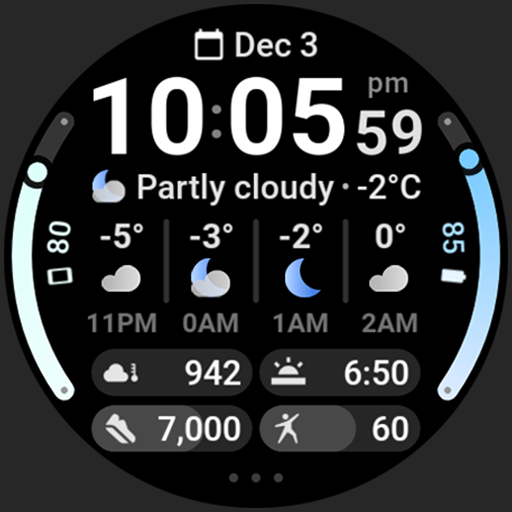
Weather Forecast Watch Face
Weather


Über diese App
Powered by Watch Face Format
Disclaimer for Galaxy Watch Users: The watch face editor in the Samsung Wearable app often fails to load complex watch faces like this one. This is not an issue with the watch face itself. It is recommended to customize the watch face directly on the watch until Samsung resolves this issue.
amoledwatchfaces.com
WEATHER DATA
• current condition icon
• current condition description
• current temperature
• today min-max temperature
• current UV Index
• current chance of rain
• hourly weather forecast (4 hours, condition, temperature)
• daily weather forecast (4 days, day condition, min-max temperatures)
FEATURES
• Watch Face Format 2
• current weather condition row animating every 5 second between different weather stats
• tap on weather forecast to switch between hourly and daily forecast!
• tap on current weather condition to launch weather app
• multilanguage
• flavors feature support (Wear OS 5)
• 7 custom complication slots (max)
• includes common complication types - RANGED_VALUE, SHORT_TEXT, MONOCHROMATIC_ICON
• optional digital clock fonts
• material color themes (palette)
• make it your own, combine theme & arc slot colors
• three optional AOD looks
• 12/24 h time format with leading zero
• tap on digital clock to open alarm
• tap on 3 dots to open system settings
USER CONFIGURATIONS
• Material Theme (60+)
• Arc 1 Color (60+)
• Arc 2 Color (60+)
• Weather Icon Pack (2x)
• Clock Font (4x)
• AOD (3x)
• Temperature Bar (Toggle)
• Today Summary (Toggle)
• Custom Complications (7x)
BUY ONE GET ONE OFFER!
amoledwatchfaces.com/bogo
CUSTOM COMPLICATION APPS
amoledwatchfaces.com/apps
Installation and troubleshooting guide
amoledwatchfaces.com/guide
Please send any issues reports or help requests to our support address
[email protected]
Join our Telegram group for live support and discussion
t.me/amoledwatchfaces
Newsletter
amoledwatchfaces.com/contact#newsletter
amoledwatchfaces™ - Awf
App-Infos
Was gibt's Neues
• fixed clear day & night weather icon
v1.1.7
• added wff4 version
• added weather provider selection (for tap action)
v1.1.6
• added notifications row (4x) support to wff2 version
v1.1.5
• fixed 'Clear' weather icon
v1.1.4
• added wff3 version with text auto size
v1.1.3
• today summary toggle fixes
v1.1.2
• fix for DST offset correction causing wrong forecast day names
v1.1.0
• added Today Summary toggle
...
Bewertungen
the best. the best watchface from the market. only one thing is missing, down, when you can select option, maybe is better to select what you want
Great watch face, I love the clean layout and options to customize. It’s great to use while hiking or kayaking so I can get a quick look at the forecast for the next few hours. The developer is very responsive. I reached out with a suggestion and a question and he responded within minutes. Definitely check out his other watch faces, he has great offerings.
Nice watch face. How to change temprature unit into celcius?
Great watchface, however as others have mentioned it needs another option for weather source data. If you have a samsung galaxy watch but not phone the samsung weather DOES NOT update automatically (been broken for probably a year now), yes this is samsung's problem at the root, but we need another solution I can't use this watchface without another weather source (and google weather is gone as well now)
The face itself is fantastic, but it's using Samsung Weather on my Ultra to show the weather, and Samsung Weather sucks and doesn't update without manually being refreshed. Please add an option to use Google Weather instead, as that actually works.
looks very similar to the Samsung ultra info board face, but the weather actually works (there's a problem with Samsung's if your phone isn't Samsung) so for me it's near perfect! would like the edge complications to have more options (like timer or stopwatch) but that's a small request. great watch face!


