

UsA Sequence Animated - USA175
Personalization
4.9
3.1K+ Downloads
"Unique vertical sequence watch face with sliding animation for Wear OS"
Auf Google Play installieren
Kostenpflichtige App


Über diese App
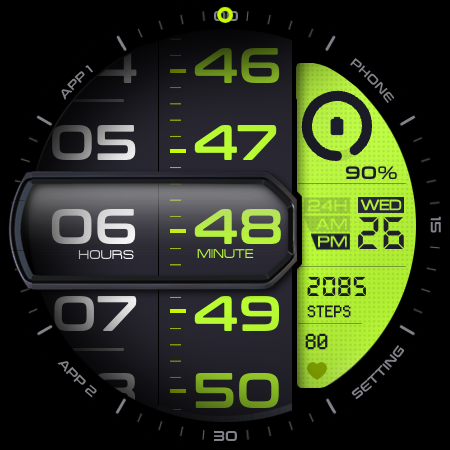
A unique vertical slide movement watch. Combined with digital LCD that shows information that can be customized. Choose your style from metal material style to digital LCD color style.
This watch face requires Wear OS API 33+ (Wear OS 4 or newer). Compatible with Galaxy Watch 4/5/6/7/8 Series and newer, Pixel Watch series and other watch face with Wear OS 4 or newer.
Features:
- 12/24 hour digital with vertical analog style
- Customize minute plate color
- Many color style option to be combined with minute plate color
- Customize Outer index
- custom info complication
- Phone and settings shortcut
- 2 custom app shortcuts
- Special Designed AOD
Make sure you are purchasing using the same Google account registered on your watch. The installation should begin automatically on the watch after a few moments.
After the installation is completed on your watch, do these steps to open the watch face on your watch :
1. Open the watch face list on your watch (tap and hold the current watch face)
2. Scroll to the right and tap "add watch face"
3. Scroll down and find new installed watch face in the "downloaded" section
Tap and hold the watch face and go to the "customize" menu (or settings icon under the watch face) to change the styles and also manage the custom shortcut complication.
To change between 12 or 24-hour mode, go to your phone date and time settings and there is an option to use 24-hour mode or 12-hour mode. The watch will sync with your new settings after a few moments.
Special designed Always On Display ambient mode. Turn on the Always On Display mode on your watch settings to show a low power display on idle. Please be aware, this feature will use more batteries.
Join our Telegram group for live support and discussion
https://t.me/usadesignwatchface
App-Infos
Version
Aktualisiert am
Oct 31, 2026
Größe
Erfordert Android
Paket-ID
com.usadesign.usasequenceanim
Installationen
3.1K+
Kategorie
Personalization
Bewertungen
4.9
Gesamtbewertungen
5
4
3
2
1
P
Paul Doucette
Jul 18, 2026
Another great watch face! Keep it up!
E
Eric Lewin
Jul 18, 2026
One of my favorites
G
Guna Retnam
Jul 18, 2026
Amazing work of Art
S
Stef Henry
Jul 18, 2026
Very nice watchface for your Galaxy Watch
S
SuperMan Bat
Jul 18, 2026
excellent work 👏
S
Satya
Jul 18, 2026
Great


