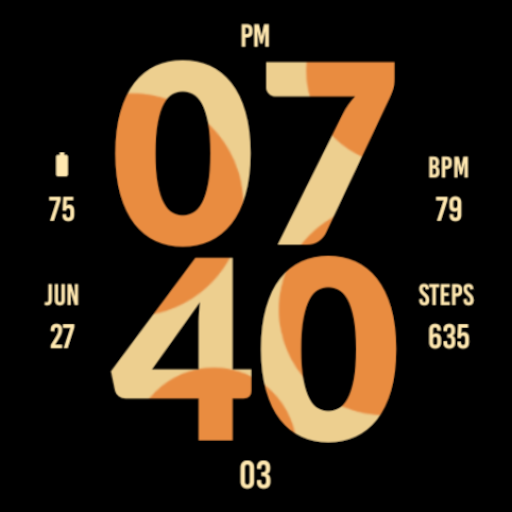
ARS Metro Digital
Personalization
0.0
360 Downloads
"Tile-inspired digital watchface for Wear OS - sleek, vibrant, and customizable."
Auf Google Play installieren
Kostenpflichtige App


Über diese App
"Transform Your Smartwatch with a Modern Tile-Inspired Watchface!"
Bring organization and style to your wrist with our sleek, tile-inspired watchface. This design Perfectly blends form and function and offers a clean and vibrant interface. Arrange your widgets effortlessly, access information at a glance, and make every moment bold and colorful. Upgrade your watch today—because time deserves a better look. 🌟
ARS Metro Digital Time for Your Watch. Supports Galaxy Watch 7 Series and Wear OS watches with API 30+.
On the "Available on more devices" section, tap the button beside your watch on the list to install this watch face.
Features :
- Change Colors Styles
- Five Complications with two custom complication
- 12/24 Hours Support
- Always on Display
After the watch face is installed, activate the watch face by these steps :
1. Open watch face selections (tap and hold the current watch face)
2. Scroll to the right and tap "add watch face"
3. Scroll down on the downloaded section
4. Tap the newly installed watch face
Bring organization and style to your wrist with our sleek, tile-inspired watchface. This design Perfectly blends form and function and offers a clean and vibrant interface. Arrange your widgets effortlessly, access information at a glance, and make every moment bold and colorful. Upgrade your watch today—because time deserves a better look. 🌟
ARS Metro Digital Time for Your Watch. Supports Galaxy Watch 7 Series and Wear OS watches with API 30+.
On the "Available on more devices" section, tap the button beside your watch on the list to install this watch face.
Features :
- Change Colors Styles
- Five Complications with two custom complication
- 12/24 Hours Support
- Always on Display
After the watch face is installed, activate the watch face by these steps :
1. Open watch face selections (tap and hold the current watch face)
2. Scroll to the right and tap "add watch face"
3. Scroll down on the downloaded section
4. Tap the newly installed watch face
App-Infos
Version
1.0.1
Aktualisiert am
Oct 17, 2026
Größe
Erfordert Android
Paket-ID
com.watchfacestudio.arsmetrodigital
Installationen
360
Kategorie
Personalization
Was gibt's Neues
API Update
Bewertungen
0.0
Gesamtbewertungen
5
4
3
2
1
K
Kumar Ghalan
Jan 25, 2025
Nice face
J
Jon Torlage
Jan 25, 2025
Great watch face. Unique but displays all the information I need.