

CELEST5431 Diver Watch
Personalization
0.0
297 Downloads
"Diver watch face with lume plots, 24-hour scale & 7 dial color variants."
Auf Google Play installieren
Kostenpflichtige App






Über diese App
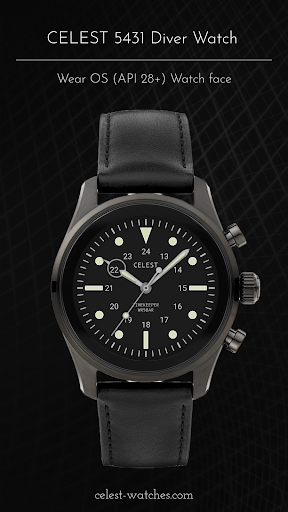
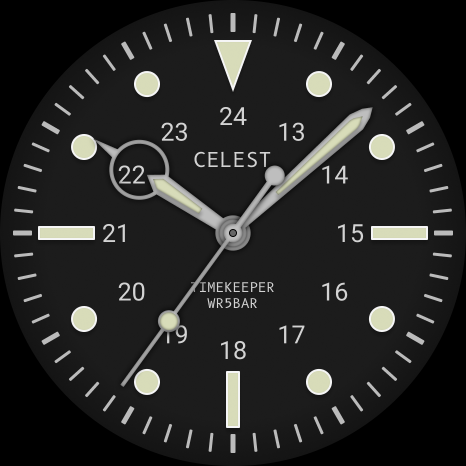
A dive dial with round lume plots and nothing spare on it. CELEST5431 Diver Watch sets raised circular markers at the hour positions with rectangular ones at the quarters, an orientation triangle at 12, and a fine minute track running the outer edge.
An inner ring numbered 13 to 24 gives 24-hour reading without adding weight, and sword hands with pale fills sweep over the dial with a thin seconds hand behind. The water-resist marking is printed on the dial the way a real tool watch prints it. There is no date window and no complication slot on this diver watch face, which is what keeps a dive dial reading correctly. Seven color variants are available: dark green, dark blue, black, brown, green, blue and AMOLED black.
⌚ Features
- Raised circular lume plots at the hour positions
- Rectangular markers at the quarters
- Orientation triangle at 12
- Inner 24-hour ring numbered 13 to 24
- Sword hands with pale fills and a thin sweeping seconds hand
🎨 Customization
- Seven color variants: dark green, dark blue, black, brown, green, blue and AMOLED black
- No complication slots: the dial stays clean and high-contrast
A proper diver watch face for people who want raised lume plots and a dial with nothing on it but the time.
✅ Compatible Devices
- Google Pixel Watch/2/3/4/5
- OnePlus Watch 2/2R/3/4
- Oppo Watch X2/X3
- Samsung Galaxy Watch 4/4 Classic/5/5 Pro/6/6 Classic/7/8/8 Classic/9/FE/Ultra (2024)/(2025)/Ultra 2
- Xiaomi Watch 2/2 Pro/5
🎁 BOGO Promotion: https://celest-watches.com/bogo/
✨ Explore the complete CELEST collection in one place — including all Wear OS, HUAWEI, and Apple Watch faces, along with our apps and tools — with the CELEST Catalog app: https://play.google.com/store/apps/details?id=com.celestwatches.catalog
🔧 Installation Help
Having trouble? We've got you covered:
- Use the dropdown menu next to "Install" on your phone to select your watch model or install directly from your watch's Play Store app.
- Updating weather data (if the watch face shows weather) may take time after installation but switching to another watch face and switching back or restarting both the watch and phone usually helps.
- Check out our installation and troubleshooting guide: https://celest-watches.com/installation-troubleshooting/
- Contact us at [email protected] for quick support
📞 Support & Community
📧 Support: [email protected]
📱 Follow @celestwatches on Instagram and subscribe to our newsletter to get notified of new releases and deals: https://celest-watches.com/newsletter/
An inner ring numbered 13 to 24 gives 24-hour reading without adding weight, and sword hands with pale fills sweep over the dial with a thin seconds hand behind. The water-resist marking is printed on the dial the way a real tool watch prints it. There is no date window and no complication slot on this diver watch face, which is what keeps a dive dial reading correctly. Seven color variants are available: dark green, dark blue, black, brown, green, blue and AMOLED black.
⌚ Features
- Raised circular lume plots at the hour positions
- Rectangular markers at the quarters
- Orientation triangle at 12
- Inner 24-hour ring numbered 13 to 24
- Sword hands with pale fills and a thin sweeping seconds hand
🎨 Customization
- Seven color variants: dark green, dark blue, black, brown, green, blue and AMOLED black
- No complication slots: the dial stays clean and high-contrast
A proper diver watch face for people who want raised lume plots and a dial with nothing on it but the time.
✅ Compatible Devices
- Google Pixel Watch/2/3/4/5
- OnePlus Watch 2/2R/3/4
- Oppo Watch X2/X3
- Samsung Galaxy Watch 4/4 Classic/5/5 Pro/6/6 Classic/7/8/8 Classic/9/FE/Ultra (2024)/(2025)/Ultra 2
- Xiaomi Watch 2/2 Pro/5
🎁 BOGO Promotion: https://celest-watches.com/bogo/
✨ Explore the complete CELEST collection in one place — including all Wear OS, HUAWEI, and Apple Watch faces, along with our apps and tools — with the CELEST Catalog app: https://play.google.com/store/apps/details?id=com.celestwatches.catalog
🔧 Installation Help
Having trouble? We've got you covered:
- Use the dropdown menu next to "Install" on your phone to select your watch model or install directly from your watch's Play Store app.
- Updating weather data (if the watch face shows weather) may take time after installation but switching to another watch face and switching back or restarting both the watch and phone usually helps.
- Check out our installation and troubleshooting guide: https://celest-watches.com/installation-troubleshooting/
- Contact us at [email protected] for quick support
📞 Support & Community
📧 Support: [email protected]
📱 Follow @celestwatches on Instagram and subscribe to our newsletter to get notified of new releases and deals: https://celest-watches.com/newsletter/
App-Infos
Version
Aktualisiert am
Aug 05, 2026
Größe
Erfordert Android
Paket-ID
com.watchfacestudio.celest5431
Installationen
297
Kategorie
Personalization
Was gibt's Neues
Updated to target Android 16 (API 36).
App-Berechtigungen
-
Other
- view network connections
- full network access

Bewertungen
0.0
Gesamtbewertungen
5
4
3
2
1
I
IX
May 06, 2026
I love diver style watch faces and this one is beautiful ❤️ The 3D pop looks perfect! Well done!
a
armaan modi
Mar 24, 2023
looks good and works
s
steven freitag (VapoRater)
Mar 19, 2023
Cool watchface
J
Jeremy Edwards
Feb 25, 2023
Great watch face. Good always on display.


