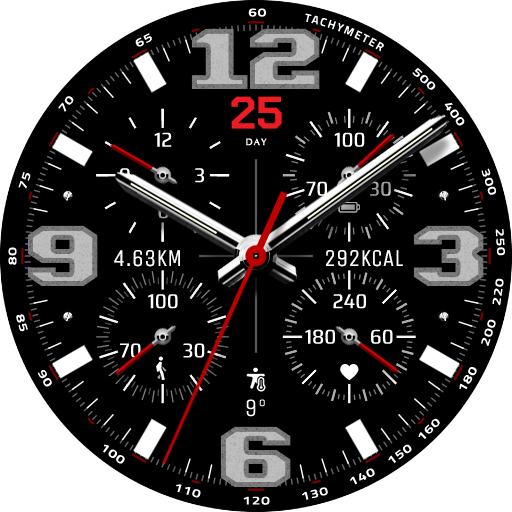
CELEST5611 Analog Watch
Personalization
0.0
547 Downloads
"Analog watch face with step, battery, month & weekday subdials, 30 colors."
Auf Google Play installieren
Kostenpflichtige App





Über diese App
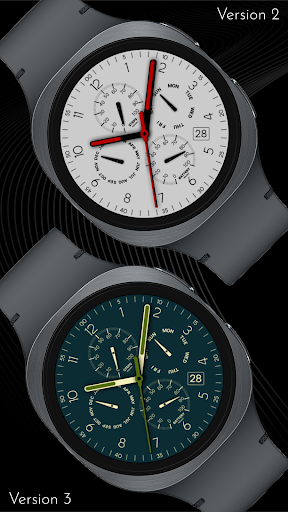
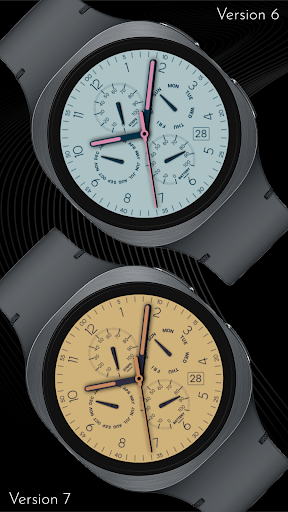
Analog, in chronograph form, with real data in the subdials: CELEST5611 Analog Watch puts steps at twelve, battery at six, the month at nine, and the weekday at three, so four things you actually check are read off the dial the way a chronograph reads elapsed time. For Wear OS 5+ devices, including Galaxy Watch and Pixel Watch.
Steps and battery run on percent scales, which means you see how far through the day or the charge you are rather than a raw figure. The month and weekday subdials sweep their own labeled tracks, and a framed date window sits between four and five o'clock. Hands with a colored center stripe and a contrasting seconds hand stay legible over the whole layout. Hide any of the four default subdials and a large color-matched complication takes its place, so weather, heart rate, or your next appointment can live there instead without breaking the look.
⌚ Features
- Classic chronograph layout with four working subdials
- Steps and battery shown on percent scales
- Month and weekday tracks with a framed date window
- High-contrast hands with a colored center stripe
- Four large color-matched complications in place of the default subdials
🎨 Customization
- 30 color options
- 4 marker options, from Arabic numbers to Roman numerals and other index styles
- Hide the default subdials: steps, month, weekday, and battery
- Four optional color-matched large complications
✅ Compatible Devices
- Google Pixel Watch/2/3/4/5
- OnePlus Watch 2/2R/3/4
- Oppo Watch X2/X3
- Samsung Galaxy Watch 4/4 Classic/5/5 Pro/6/6 Classic/7/8/8 Classic/9/FE/Ultra (2024)/(2025)/Ultra 2
- Xiaomi Watch 2/2 Pro/5
🎁 BOGO Promotion: https://celest-watches.com/bogo/
✨ Explore the complete CELEST collection in one place — including all Wear OS, HUAWEI, and Apple Watch faces, along with our apps and tools — with the CELEST Catalog app: https://play.google.com/store/apps/details?id=com.celestwatches.catalog
🔧 Installation Help
Having trouble? We've got you covered:
- Use the dropdown menu next to "Install" on your phone to select your watch model or install directly from your watch's Play Store app.
- Updating weather data (if the watch face shows weather) may take time after installation but switching to another watch face and switching back or restarting both the watch and phone usually helps.
- Check out our installation and troubleshooting guide: https://celest-watches.com/installation-troubleshooting/
- Contact us at [email protected] for quick support
📞 Support & Community
📧 Support: [email protected]
📱 Follow @celestwatches on Instagram and subscribe to our newsletter to get notified of new releases and deals: https://celest-watches.com/newsletter/
App-Infos
Version
Aktualisiert am
Aug 05, 2026
Größe
Erfordert Android
Paket-ID
com.watchfacestudio.celest5611
Installationen
547
Kategorie
Personalization
Was gibt's Neues
Updated to target Android 16 (API 36).
App-Berechtigungen
-
Other
- view network connections
- full network access
- Google Play license check

Bewertungen
0.0
Gesamtbewertungen
5
4
3
2
1
A
Alan Ezequiel Lucchini
Dec 23, 2025
classy
B
Brendon Hall
Dec 22, 2025
fantastic design. classic analog done right. I love the colors and tge soft white elements. it looks so good in real life. very well done.