

CFS111 Digital
Personalization



Über diese App
⌚ Watch face information:
🕒 Digital time in 12/24-hour format based on phone settings
📅 Date
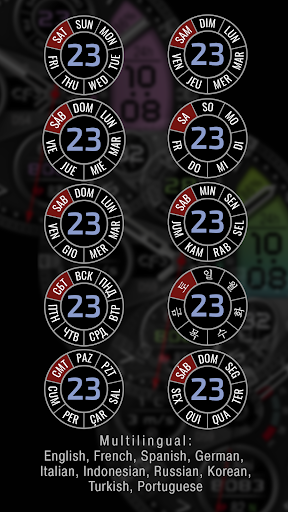
🌐 Weekdays in 10 languages*
👟 Steps
📍 Distance traveled KM/MI**
❤️ Heart rate
🔋 Watch battery level
🎨 Multiple color schemes
⚙️ Complications and customizable shortcuts
🌑 2 AOD styles with 3 brightness levels
CFS111 Digital is designed for users who prefer a sharp technical layout with large time and clearly visible essential data: date, weekday, steps, distance, heart rate, and watch battery level.
Choose your preferred color scheme and customize shortcuts and complications to suit your preferences.
🌐 Weekday language*
Select the language for the days of the week in the watch face settings.
10 languages are available:
• English
• French
• Spanish
• Portuguese
• German
• Russian
• Indonesian
• Turkish
• Italian
• Korean
📍 Distance KM/MI**
Select kilometers or miles in the watch face settings.
Distance is calculated based on the number of steps using the following formula:
1 km = 1312 steps
1 mile = 2100 steps
ℹ️ Availability of some features, complications, and other displayed information may depend on your watch and phone models, installed apps, permissions, and system settings.
⚙️ The Galaxy Wearable app may not always correctly support customization of complex watch faces. In this case, we recommend customizing the watch face directly on the watch.
To open the watch face settings, touch and hold the watch display.
⚠️ Correct operation of tap zones can only be guaranteed on Samsung watches. Their behavior may vary on watches from other manufacturers.
📧 If you experience any difficulties using the watch face, please contact us. We will try to help:
[email protected]
🌐 Installation instructions, customization tips, and additional information:
https://cfswatchfaces.com
✈️ TELEGRAM:
https://t.me/CFS_WatchFaces
Thank you for choosing our watch faces!
App-Infos
Was gibt's Neues
Bewertungen
Very functional! Not only functional but also aesthetically pleasing! This is one of the watch faces that has the MOST customization of any that I've have used. Going to be my daily driver very soon.
Great design very informative
it's working so as expected
Unable to customize, unable to refund. Fix it! The way to customize IS from the watch face on the watch. Long press causes face to remove itself and change to different face. Can't customize!
Unable to customize. Hard press on face doesn't work.
Cant costumized
Ähnliche Apps

SY26 Watch Face for Wear OS
PER84 Digital Watch Face

Ballozi NEXO - Digital Face

OZ502s Digital Watch Face

PER12 Digital Watch Face


