

JW232 jwstudio
Personalization
0.0
301 Downloads
"High-quality watchfaces for Wear OS 5.0 of higher"
Auf Google Play installieren
Kostenpflichtige App



Über diese App
This watch face supports all Wear OS devices with API level 30 or higher, such as Samsung Galaxy Watch 4, 5, 6, 7, 8, Pixel Watch, etc.
+++++++++++++++++++++++++++++++++++++++++++++++
[How to install]
Before pressing the payment button, make sure your watch is selected.
Select your watch by pressing the small triangle next to the payment button.
Select the menu at the top right of the Play Store app (three dots) > Share > Chrome browser > Install on other devices > Clock and proceed.
After installation, select it from the download list, register it as a favorite, and use it. You can view the download list by clicking 'Add Watch Screen' on the far right of the favorites list that appears when you press the watch screen.
+++++++++++++++++++++++++++++++++++++++++++++++
[function]
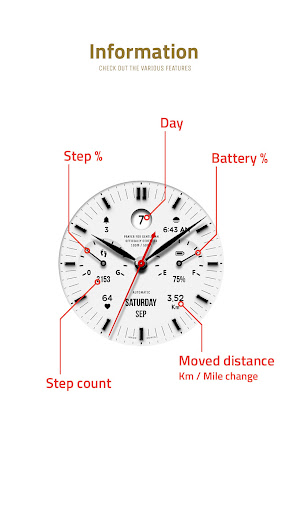
- 5 preset app shortcut
- 1 customizable shortcut keys
- 2 customizable fields/information display
- Changeable background color, hands, index
+++++++++++++++++++++++++++++++++++++++++++++++
[Custom]
1 - Touch and hold the display.
2 - Tap on Custom Options
For inquiries, please contact the email below.
[email protected]
App-Infos
Version
Aktualisiert am
Apr 04, 2026
Größe
Erfordert Android
Paket-ID
com.watchfacestudio.jwstudio_a_232
Installationen
301
Kategorie
Personalization
Was gibt's Neues
v1.2 update
- Support Android Target SDK 33 (Wear OS 5)
- Support Companion app Target API level 35
App-Berechtigungen
-
Wearable sensors/Activity data
- body sensors (like heart rate monitors)
-
Other
- reorder running apps
- control vibration
- prevent device from sleeping
- set an alarm


Bewertungen
0.0
Gesamtbewertungen
5
4
3
2
1
v
vasos adams
Dec 08, 2024
Beautiful, clear and customizable!


