

Key WF55 Snowman Watch Face
Personalization
2.6
3K+ Downloads
"Key WF55 is a Digital Watch Face with Snowman Design for Wear OS"
Auf Google Play installieren
Kostenpflichtige App


Über diese App
Buy One Get One, BOGO Promotion :
1. Buy any of our Watch Faces
2. Send email to [email protected]
3. Attach RECEIPT from Google to the email
4. Wait for the Coupon
5. You can not choose the free WF
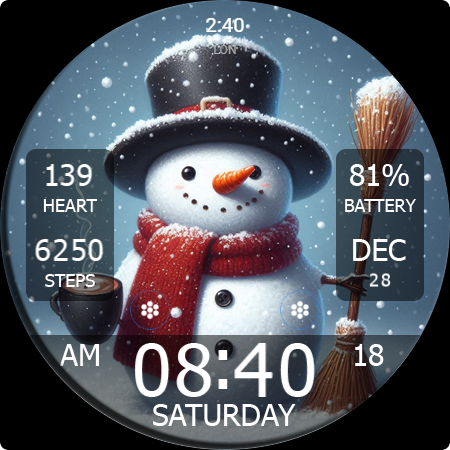
Key WF55 is a Digital Watch Face with Snowman Design for Wear OS. Key WF55 has a special Christmas theme. Key WF55 has 10 background styles with snowman images. You can choose the background style according to your preference.
Features
- 12/24H digital time format
- Month, Date, and Day Name
- Heart Rate Information
- Step Count Information
- Battery Percent Information
- Have background style
- 2 Custom Shortcuts and short circle complications.
IMPORTANT!
This is a Wear OS Watch Face app. This app only supports smartwatch devices running with WEAR OS
AOD:
Display digital clock information with 12H/24H format.
Color adjustments:
1. Press and hold your finger at center on the watch display.
2. Press the button to adjust.
3. Swipe left or right to switch between the different customizable items.
4. Swipe up or down to change the options/color of the items.
1. Buy any of our Watch Faces
2. Send email to [email protected]
3. Attach RECEIPT from Google to the email
4. Wait for the Coupon
5. You can not choose the free WF
Key WF55 is a Digital Watch Face with Snowman Design for Wear OS. Key WF55 has a special Christmas theme. Key WF55 has 10 background styles with snowman images. You can choose the background style according to your preference.
Features
- 12/24H digital time format
- Month, Date, and Day Name
- Heart Rate Information
- Step Count Information
- Battery Percent Information
- Have background style
- 2 Custom Shortcuts and short circle complications.
IMPORTANT!
This is a Wear OS Watch Face app. This app only supports smartwatch devices running with WEAR OS
AOD:
Display digital clock information with 12H/24H format.
Color adjustments:
1. Press and hold your finger at center on the watch display.
2. Press the button to adjust.
3. Swipe left or right to switch between the different customizable items.
4. Swipe up or down to change the options/color of the items.
App-Infos
Version
Aktualisiert am
Aug 16, 2026
Größe
Erfordert Android
Paket-ID
com.watchfacestudio.keywf55
Installationen
3K+
Kategorie
Personalization
Bewertungen
2.6
Gesamtbewertungen
5
4
3
2
1
D
Dawn McClure
Dec 23, 2024
Dang thing wouldn't load 😡, after I paid!
D
Desiree Alexander
Dec 10, 2024
Would give 0. Won't install for the 2nd time.
R
Roger Hallsworth
Dec 09, 2024
Great festive watch face and easy to download, well done.
K
Kelly L
Dec 07, 2024
Paid twice, and it wouldn't install on my watch.
C
Connie Montgomery
Dec 07, 2024
Heart shows 210 bpm!
D
Diana Vick
Dec 05, 2024
Çs


