

ML2U 330b Watch Face
Personalization
0.0
603 Downloads
"Wear OS Watchface With Customizable Complication"
Auf Google Play installieren
Kostenpflichtige App




Über diese App
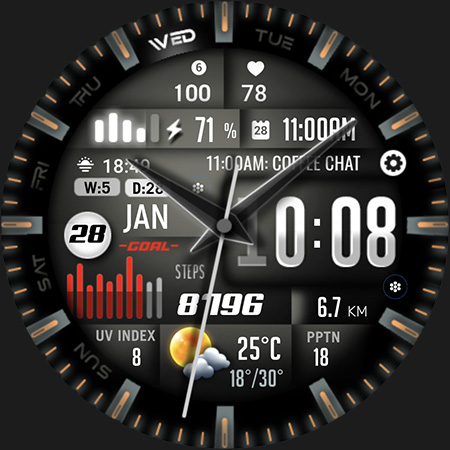
Elevate Your Wrist Game with ML2U 330b Watch Face.
Experience the ultimate fusion of rugged utility and modern tech. The ML2U 330b watch face is designed for those who demand data at a glance without sacrificing a bold, tactical aesthetic.
FEATURES:
- 12/24hr based on phone settings
- Day/Date(Tap for Calendar)
- Steps
- Distance(Tap for Google Map)
- Battery(Tap for detail)
- Weather Info(Tap for detail)
- 2 customizable shortcuts
- 5 customizable complications
- Changeable color
- Alarm(Tap Hour first digit)
- Music(Tap Hour second digit)
- Phone(Tap Minute first digit)
- Message(Tap Minute second digit)
- Setting
If the weather information displays "NO INFO", please try one of the following methods to fix it:
Method 1: Switch to a different watch face that includes weather information, then switch back to this one.
Method 2: Tap “NO INFO” to open the weather app, then tap the refresh icon next to the "last updated" timestamp.
To customise your watch face, simply touch and hold the display, then tap the Customise button.
This watch face is compatible with all Wear OS 5 or above devices.
Watch face don’t automatically apply on your watch screen after the installation. You need to set it on your watch’s screen.
Thank you very much for your support!!
ML2U
App-Infos
Version
Aktualisiert am
Sep 05, 2026
Größe
Erfordert Android
Paket-ID
com.watchfacestudio.ml2u330b
Installationen
603
Kategorie
Personalization
Was gibt's Neues
First release companion app
App-Berechtigungen
-
Other
- Google Play license check

Bewertungen
0.0
Gesamtbewertungen
5
4
3
2
1
G
Grigorescu Ionut
May 16, 2026
weather animation feature in this one love it , congrats


