Nuclear Splash Left MOD
Personalization




Über diese App
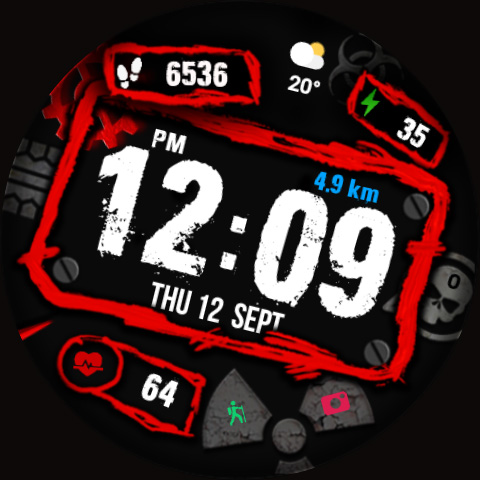
Basic moments:
- time format 12/24 hours;
- Date
- Day
- Battery
- Pulse rate
- A high resolution;
- Ability to change styles
- Possibility to change color
- Change the color of the digital clock
- Custom complications
- AOD mode
Compatible with Wear OS devices running API level 30 and above, including Samsung Galaxy Watch 4, 5, 6, 7, 8 and Pixel Watch.
**Installation**
1. Install the watch face app on your phone.
2. Make sure your Wear OS watch is connected to your phone and uses the same Google account.
3. Select your watch as the installation device and complete the installation.
4. After installation, select the watch face from your watch face gallery.
If installation is delayed, check the internet connection on both devices, wait a minute or two, or restart your watch and try again.
**Customization**
• Touch and hold the watch face, then tap **Customize** to access the available settings.
• For the best experience, we recommend configuring the watch face directly on your watch. Video guide:
https://youtu.be/YPcpvbxABiA
**Support**
If you have any questions or installation issues, please contact: [email protected]
**More watch faces by WIN**
Explore other watch faces:
https://play.google.com/store/apps/dev?id=6789054753742990227
App-Infos
Was gibt's Neues
- Added a new camouflage background
- Fixed a weather display issue
App-Berechtigungen
-
Other
- full network access

Bewertungen
Very. Nice.I like it something different.Thank you
Purchased it because I have every other digital watch this dev made, why not get this one as well? They're all the same: well-made, with high degree of customizable colors, shortcuts and complications. I remember downloading my first one on my first Tizen Samsung watch, years ago... I'm sad now because I'm old.
Elegant design and beautiful colours, I liked this watch face
Great watch design!!
Great watchface. Easy to add complications. Nice choice of colors. Highly recommend.