

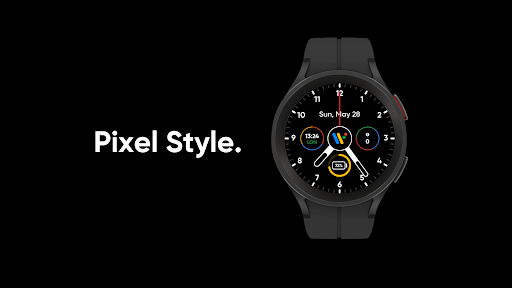
Pixel Style Analog Watch Face
Personalization
0.0
977 Downloads
"A basic Wear OS style watch face. Read description before installing!"
Auf Google Play installieren
Kostenpflichtige App




Über diese App
Note: Only supports watches launched with WearOS 3.0 or higher.
IMPORTANT #1: To use the watch face you must:
1. Hold down on your current watch face to enter selection mode.
2. Scroll to the right until you see "+" and click on it.
3. Scroll until you see "Pixel Style Analog", and select it.
4. Read "IMPORTANT #2".
IMPORTANT #2: Make sure you allow all permissions requested! In case you accidentally denied access to health data, restart your watch. To do this, you just need to power your watch off and turn it back on.
Features:
• Preset battery complication
• Preset date complication
• Preset heart rate complication (click the Wear OS logo to update)
• 2 customizable complications
• Customizable (transparent) hour & minute hands
• AOD supported
• Does not store any of your personal data
• Battery efficient
Bug report & suggestions:
Contact [email protected]
Wear OS by Google and Pixel are trademarks of Google LLC.
App-Infos
Version
Aktualisiert am
Aug 28, 2026
Größe
Erfordert Android
Installationen
977
Kategorie
Personalization
Was gibt's Neues
• Support Android Target SDK 35
Bewertungen
0.0
Gesamtbewertungen
5
4
3
2
1
D
Dave Bostock
Jan 27, 2025
Freezes my TicWatch Atlas 4.0 wearOS and my Pixel Watch 3 5.0 wesrOS
B
Brett Calder
Dec 29, 2024
I love this watch face (I use the third option). I had an issue when I had the watch brick on me and in resetting, support was right on it to get me back in action. Thanks 🙏
s
surya kh
Dec 31, 2023
Absolutely gorgeous watch face, very clean and minimal design.
H
Hussein H
Dec 29, 2023
Super clean!
S
Stephen Campbell
Jun 20, 2023
Brilliant watch face, but an absolute battery guzzler.


