

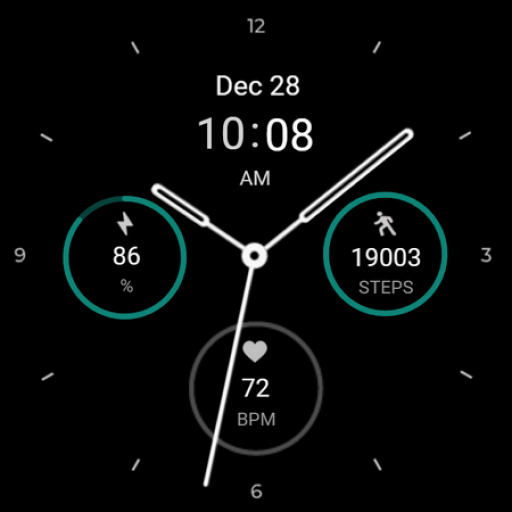
Regarder Midnight V2 Watchface
Personalization


Über diese App
Just open the Mobile Companion app and follow the instructions there.
In case this does not work. You can use a PC and install it from there
If this option still does not work you can install the watch face from your wear os Device, here are the instructions:
1. On your Wear OS smartwatch, open the Google Play Store.
2. Search for "Regarder Minimal 2" and select the app from the search results.
3. Tap "Install" to begin the installation process.
4. Once the installation is complete, you can find the watch face in the "Watch Faces" section of your smartwatch's settings.
5. Select Regarder Minimal 2 as your active watch face.
App-Infos
Bewertungen
very good, like the style. heart rate needs work though, gets stuck blank sometimes
HR display stops when the face goes to sleep. Non-starter for me. 12/23 - still can't I use the face. should I ask for a refund? oh yeah, did not get my free watch face per your promo.
I think this looks great but the fact that you can't change the default complications was pretty disappointing. You're stuck with battery level, step count, and heart rate.
The complications cannot be changed. I am setting them to weather. Nothing happens. It keeps displaying steps, that I do not want to see. The watch face looks good, but you are stuck with the default complications. The developer could use AI and debug the app. We'd happily pay a bit more to buy it if it was debugged.
Hi, how do you set the 24hr option?
Cannot change all the complications
Ähnliche Apps

Regarder Minimal 71 Watch Face

Elegant Analog Watch Face

MAHO008 Wear OS Watch Face

Minimal Black v15 Watch Face

Regarder Twilight Watch Face


