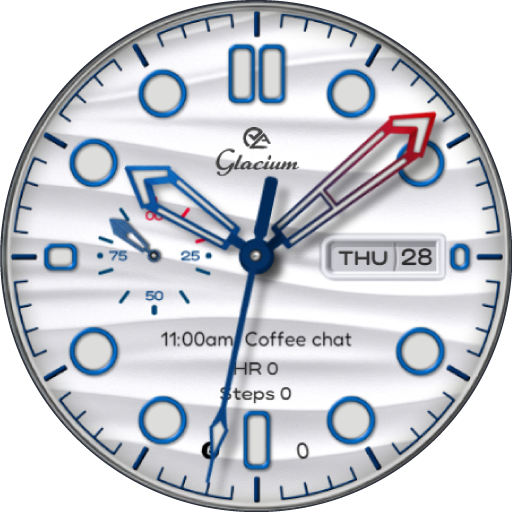
S4U Dive - Diver watch face
Personalization


Über diese App
****
⚠️ IMPORTANT: Compatibility
This is a Wear OS Watch Face app and supports only smartwatches running Wear OS 5 or higher (Wear OS API 34+).
Compatible devices include:
- Samsung Galaxy Watch 4, 5, 6, 7, 8 (incl. Ultra and Classic Versions)
- Google Pixel Watch 1–3
- Other Wear OS 5+ smartwatches
If you experience any issues with installation or downloading, even on a compatible smartwatch:
1. Open the companion app provided with your purchase.
2. Follow the steps in the Install/Issues section.
Still need help? Feel free to email me at [email protected] for support.
****
✨ Key Features:
Ultra realistic design.
Wide range of color options for personalization.
Clear and easily readable display with high-contrast markings.
Two customizable complications.
Five customizable shortcuts.
Perfect for users who want a diving-themed watch face.
Completely black background is available as an option.
Dive into sophistication and elevate your Wear OS device with our unique and functional watch face. Download now and experience the difference!
****
🎨 CUSTOMIZATION OPTIONS
1. press and hold finger on the watch display.
2. press the button to adjust.
3. Swipe left or right to switch between the different customizable items.
4. Swipe up or down to change the options/color of the items.
- Color (14 different colors for battery indicator, day of the week and logo combined)
- Background Color (black, blue, mint, green, bordeaux, purple)
- Main Index Color (white, sky blue, mint, green, yellow, orange, pink)
- Index style (with numbers, without numbers, small marks)
- Hands (silver transparent, white, sky blue, mint, green, yellow, orange, pink)
- Logo (7 different logos + no logo)
- Pure Black (pure black background)
- AOD brightness (3 different brightness options)
****
Additional functionality:
The battery indicator is located in the upper right circle between 0 (0%) and 4 (100%) o'clock.
****
🌙 Always-On Display (AOD)
Important Notes:
- Using AOD will reduce battery life, depending on your smartwatch's settings.
- Some smartwatches may automatically dim the AOD display based on ambient light conditions.
⚙️ COMPLICATIONS & SHORTCUTS
Enhance your watch face with customizable app shortcuts and complications:
- App Shortcuts: Link to your favorite widgets for quick access.
- Editable Complications: Display the data you need most by customizing the visible values.
1. Press and hold the watch display.
2. Push the customize button.
3. Swipe from right to left until you reach the "complications".
4. 5 shortcuts and the 2 custom complications are highlighted. Click on it to set what you want here.
If you want to have more values inside of your complications list, check the Play Store for Wear OS complications.
****
📬 Stay Connected
If you enjoy this design, be sure to check out my other creations! I’m constantly working on new watch faces for Wear OS. Visit my website to explore more:
🌐 https://www.s4u-watches.com
Feedback & Support
I’d love to hear your thoughts! Whether it’s something you like, dislike, or a suggestion for future designs, your feedback helps me improve.
📧 For direct support, email me at: [email protected]
💬 Leave a review on the Play Store to share your experience!
Follow Me on Social Media
Stay up to date with my latest designs and updates:
📸 Instagram: https://www.instagram.com/matze_styles4you/
👍 Facebook: https://www.facebook.com/styles4you
▶️ YouTube: https://www.youtube.com/c/styles4you-watches
🐦 X: https://x.com/MStyles4you
App-Infos
Was gibt's Neues
Minor fixes.
App-Berechtigungen
-
Other
- view network connections
- full network access
- Google Play license check

Bewertungen
Beautiful watch face,
Hands down 1 of the best diver designs out there. Clean look. Love the color choices. Amazing design by the best desiner around. thank you S4U. Keep up giving us always the best designs.
Won't let me update on phone (Pixel 10 Pro XL), watch is Galaxy 5 Pro
love this watchface, what weather app are you using to get the description of weather on the screen and how do you get steps to be by the side of steps counter not underneath
Buggy, don't buy
Thank you! A realistic beautifully designed smart watch face. A stylish hybrid of realistic/ electronic. There are virtually no others on Google Play. Thank goodness the shortcuts don't put ugly icons on the face. AOD is great, not something completely different to the face as per so many. AND the AOD corresponds to your colour and hand choices for main face. Fantastic typeface and logos. I have pure black face, white hour markers, blue hands and decals, striped hands, dive logo. Love it! 5*