

Tancha S34 Retro Digital
Personalization
0.0
110 Downloads
"The perfect looks and easy to read Retro Digital watch face."
Auf Google Play installieren
Kostenpflichtige App




Über diese App
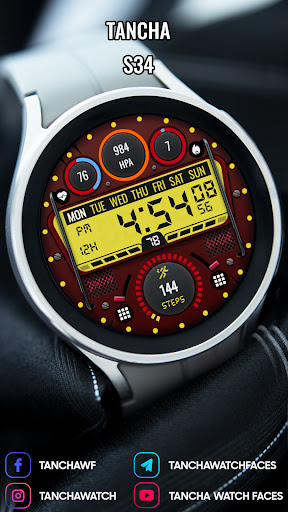
Tancha S34 Retro Digital Watch Face
The perfect looks and easy to read Retro Digital watch face.
This watch face is developed by Tancha Watch Faces for use on Wear OS devices.
FEATURES
Retro Digital Watch Face
* Color customizations.
* Digital time - Support 12/24 Hours time format.
* Day of the week.
* Date of the month.
Custom Complications:
Activate the watch face. Touch and hold the screen. Press the Customize button.
Select complication from the menu.
* Steps counter and steps percent progress bar.
* Battery status.
* Heart rate.
NOTE :Make sure you have allowed the access sensor.
* Burned calories.
* Visible Always on view.
FAQ :
1- The watch face is installed on your watch but does not appear in the catalog?
FOLLOW THESE STEPS:
Press and hold your watch screen.
Swipe right until you see the text 'Add watch face.'
Press the '+ Add watch face' button.
Find and activate the watch face you installed.
2- If the companion app is installed but the watch face is not, follow the steps below:
FOLLOW THESE STEPS:
Open the companion app on your phone (ensure that your smartwatch is connected to your phone).
Next, tap the 'INSTALL WATCH FACE ON WATCH' button at the bottom of the app.
This will open the Play Store on your WEAR OS smartwatch, displaying the purchased watch face and allowing you to install it directly.
If you have any questions or requests, please don't hesitate to get in touch with me at [email protected].
Thank you sincerely for your support.
Best regards,
Tancha Watch Faces
App-Infos
Version
Aktualisiert am
N/A
Größe
Erfordert Android
Paket-ID
com.watchfacestudio.tanchas34
Installationen
110
Kategorie
Personalization
App-Berechtigungen
-
Other
- view network connections
- pair with Bluetooth devices
- access Bluetooth settings
- full network access


