

Minimalist Focus Watch Face
Personalization
0.0
264 Downloads
"A Minimalist Wear OS watch face with a different way of reading time.."
Install on Google Play
Paid App



About this app
Installation:
1. Make sure your watch is connected to your phone via Bluetooth.
2. Install, download and open the companion app.
3. Go to the watch Play Store, and type the exact watch name(with correct spelling and spacing) and open listing. If price still appears, wait for 2-5 minutes or restart your watch face.
4. Please also try installing the watch face via Galaxy Wearable app(install it if not installed)> Watch Faces> Downloaded and apply it to watch.
5. You can also install this watch face by accessing the Google Play Store in the web browser in a PC or Laptop. Make sure you use the same account you made the purchase from to avoid double charge.
6. If PC/laptop not available, you can use the phone web browser. Head over to the Play Store app, then to the watch face. Click the 3 dots in the upper right hand corner then Share. Use the available browser, login to the account you made the purchase from and install it there.
About the watch face:
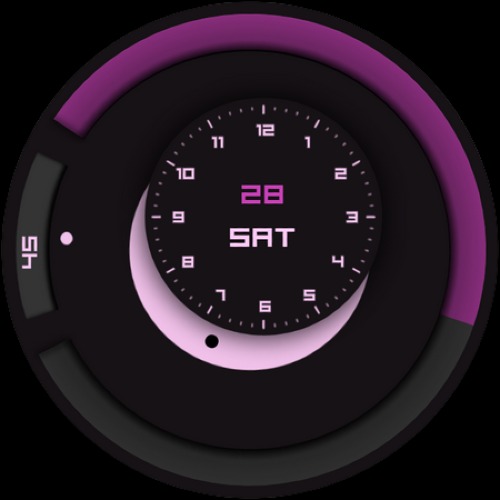
A minimalist Wear OS watch face with:
1) Black Dot Points to the current hour on the rotating disk
2) Outside dot follows minute window
3) Optional Border Shadow
4) Revolving Battery Progress bar
5) 7 Color options Available
More to come in future updates..
1. Make sure your watch is connected to your phone via Bluetooth.
2. Install, download and open the companion app.
3. Go to the watch Play Store, and type the exact watch name(with correct spelling and spacing) and open listing. If price still appears, wait for 2-5 minutes or restart your watch face.
4. Please also try installing the watch face via Galaxy Wearable app(install it if not installed)> Watch Faces> Downloaded and apply it to watch.
5. You can also install this watch face by accessing the Google Play Store in the web browser in a PC or Laptop. Make sure you use the same account you made the purchase from to avoid double charge.
6. If PC/laptop not available, you can use the phone web browser. Head over to the Play Store app, then to the watch face. Click the 3 dots in the upper right hand corner then Share. Use the available browser, login to the account you made the purchase from and install it there.
About the watch face:
A minimalist Wear OS watch face with:
1) Black Dot Points to the current hour on the rotating disk
2) Outside dot follows minute window
3) Optional Border Shadow
4) Revolving Battery Progress bar
5) 7 Color options Available
More to come in future updates..
App Info
Version
Updated on
N/A
Size
Requires Android
Package ID
com.minimalistfocus
Installs
264
Category
Personalization
Ratings and Reviews
0.0
Total ratings
5
4
3
2
1
s
surya kh
Aug 27, 2023
Well done new creativity design watch face


