

JW201 jwstudio watchface
Personalization




About this app
+++++++++++++++++++++++++++++++++++++++++++++++
[How to install]
Before pressing the payment button, make sure your watch is selected.
Select your watch by pressing the small triangle next to the payment button.
Select the menu at the top right of the Play Store app (three dots) > Share > Chrome browser > Install on other devices > Clock and proceed.
After installation, select it from the download list, register it as a favorite, and use it. You can view the download list by clicking 'Add Watch Screen' on the far right of the favorites list that appears when you press the watch screen.
+++++++++++++++++++++++++++++++++++++++++++++++
[Features]
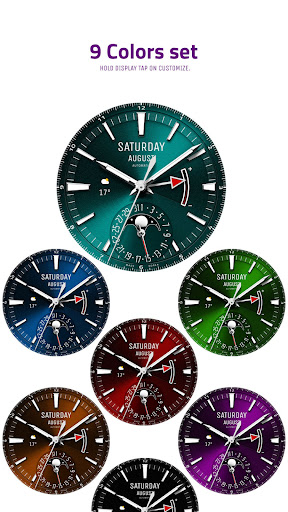
- 9 Colors set
- 4 Index Style
- 5 Pattern Style
- 3 Hands Style
- 3 Battery Hands style
- AOD Simple mode
[function]
- 3 preset app shortcut
- 4 customizable shortcut keys
- 1 customizable fields/information display
+++++++++++++++++++++++++++++++++++++++++++++++
[Custom]
1 - Touch and hold the display.
2 - Tap on Custom Options
For inquiries, please contact the email below.
[email protected]
App Info
What's New
App Permissions
-
Other
- reorder running apps
- control vibration
- prevent device from sleeping
- set an alarm

Ratings and Reviews
This developer is fantastic. The watches are always so clean and elegant.
very good
Looks princely, regal clean dress watch.
This is a beautiful watchface, but is ruined by the ugly red pointer for the battery level. I would also like to see a much less detailed AOD. I tried it for 2 days to compare battery life against my go-to watchface, and I get about 20% less battery life with this face. Some chosen complications don't show on the face either. A few changes will make this a winner in my book.
nice one


