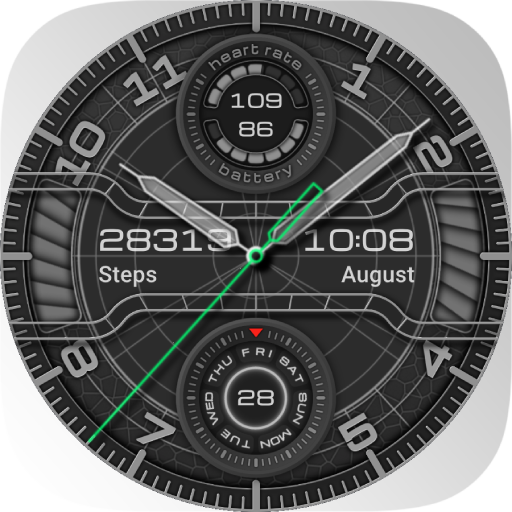
nbWatch Ultra Pro
Personalization
3.4
3.9K+ Descargas
"Watchface displays compass direction, with style customization"


Acerca de esta app
This watchface is for Wear OS 4 and below, displays compass direction, with customization when double tap on center screen:
- Double tap the top of the screen to change compass on/off
- Double tap the bottom of the screen to change skin colors
- Customization (double tap on center screen), list of surrounding buttons, click to open the function that needs customization:
+ Watchface info: premium purchase status, if you haven't purchased it in inapp-purchase the Buy Premium button will be available here
+ Companion data: the 2 circles of the center screen are 2 customizable companion data, tap on the circle to setup them. There are 6 customizable data available: date/day of week, battery level, heart rate, daily steps count, sunrise, sunset
+ Show/hide clock hand
+ Time format: 24h/AM/PM/Follow system
+ Permissions: the watch face requires 3 basic types of permissions to operate: location for information circle/sunrise time/sunset time, sensor (heart rate)/activity (steps count) to return health data. These permissions are needed for the app for functions to work correctly. Grant permission there if it is not already allowed
### IMPORTANT: Health data including Heart Rate and Steps is passively obtained from Samsung Health or Health Platform for other watches. It will take a little time (up to 10 minutes) to get the exact data, for an undetermined amount of time it will display n.a.
* AOD supported
**Ads only show up on the mobile app to make it more frequent to issue coupons**
** Add rewarded ads to extend your trial, for users who cannot/do not want to purchase Premium:
- Mobile & Watch connect to the same WIFI network or Bluetooth
- The maximum number of days that can be accumulated is 9 days
- See to know: https://youtu.be/6zNEMOwk-H0
+ This watch face is available for trial for 360 minutes or Watch Ads to extend
+ When the trial expires, a message to buy Premium (in-app purchase) will appear on the watch face. Double-tap on the screen to proceed with the purchase.
+ To check Premium, hold press the watchface, select custom menu. If you haven't purchased it yet, the Buy Premium button will be available here to purchase it.
And many more features will be updated in the coming period.
Please send any crash reports or request help to our support address.
We appreciate your feedback!
*
Offical site: https://nbsix.com
- Double tap the top of the screen to change compass on/off
- Double tap the bottom of the screen to change skin colors
- Customization (double tap on center screen), list of surrounding buttons, click to open the function that needs customization:
+ Watchface info: premium purchase status, if you haven't purchased it in inapp-purchase the Buy Premium button will be available here
+ Companion data: the 2 circles of the center screen are 2 customizable companion data, tap on the circle to setup them. There are 6 customizable data available: date/day of week, battery level, heart rate, daily steps count, sunrise, sunset
+ Show/hide clock hand
+ Time format: 24h/AM/PM/Follow system
+ Permissions: the watch face requires 3 basic types of permissions to operate: location for information circle/sunrise time/sunset time, sensor (heart rate)/activity (steps count) to return health data. These permissions are needed for the app for functions to work correctly. Grant permission there if it is not already allowed
### IMPORTANT: Health data including Heart Rate and Steps is passively obtained from Samsung Health or Health Platform for other watches. It will take a little time (up to 10 minutes) to get the exact data, for an undetermined amount of time it will display n.a.
* AOD supported
**Ads only show up on the mobile app to make it more frequent to issue coupons**
** Add rewarded ads to extend your trial, for users who cannot/do not want to purchase Premium:
- Mobile & Watch connect to the same WIFI network or Bluetooth
- The maximum number of days that can be accumulated is 9 days
- See to know: https://youtu.be/6zNEMOwk-H0
+ This watch face is available for trial for 360 minutes or Watch Ads to extend
+ When the trial expires, a message to buy Premium (in-app purchase) will appear on the watch face. Double-tap on the screen to proceed with the purchase.
+ To check Premium, hold press the watchface, select custom menu. If you haven't purchased it yet, the Buy Premium button will be available here to purchase it.
And many more features will be updated in the coming period.
Please send any crash reports or request help to our support address.
We appreciate your feedback!
*
Offical site: https://nbsix.com
Info de la App
Versión
8.6.8
Actualizado el
Oct 26, 2024
Tamaño
Requiere Android
ID del paquete
com.nbsix.ultrapro
Instalaciones
3.9K+
Categoría
Personalization
Permisos de la aplicación
-
Location
- approximate location (network-based)
- precise location (GPS and network-based)
-
Wearable sensors/Activity data
- body sensors (like heart rate monitors)
-
Other
- view network connections
- full network access
- prevent device from sleeping


Calificaciones y opiniones
3.4
Calificaciones totales
5
4
3
2
1
A
Adriel Karuga
Feb 06, 2026
It doesn't show the right watchface
V
Victor Koscielniak
Mar 02, 2025
why do you have to pay?
j
john bennett
Jan 30, 2025
Total waste of money. Who has OS4.
K
K. T.
Jan 10, 2025
Purchased premium, it still says I don't have premium, have un-installed and reinstalled, can't customize it. Waste of money
E
Elshaday Michael Kinanga
Nov 10, 2024
Good