

Liquid Glass Watch Face
Personalization
4.8
913 Descargas
"A refined minimalism, many options, and selection of depth effect backgrounds!"
Instalar en Google Play
App de pago




Acerca de esta app
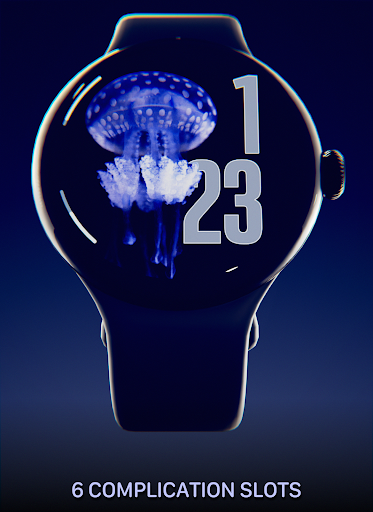
This watch face is inspired by the liquid glass design and embraces minimalism in a unique and pleasant way, designed to be extremely customizable it features a collection of 10 depth effect wallpapers (more to come!).
Introduction
This is a native, standalone Wear OS watch face. This means that it can be installed on many smartwatches running this OS (like Samsung, Mobvoi Ticwatch, Fossil, Oppo, the latest Xiaomi and more). If you need help to be sure it's compatible with your device, send me an email!
It is completely handcrafted, to be unique.
Features
The watch face includes:
◉ 30 color schemes
◉ Many different customizations
◉ Customizable clock font, solid or glass effect
◉ 10 beautiful depth effect wallpapers
◉ Optional date and batter/seconds meters
◉ Reacts to low battery, notifications and charging
◉ 6 customizable complications, in different sizes!
◉ Easy to use (and uninstallable) companion app
Installation
The installation is straightforward, don't worry!
Here's the procedure and a quick Q&A:
◉ Install this app in your smartphone
◉ Open it, and connect your Wear OS smartwatch to your device
◉ If the watch is connected, you will be able to tap the "view and install on smartwatch" button. (if not, refer to the Q&A below)
◉ Check your watch, you should see my watch face and the install button (if you see the price instead, refer to the Q&A below)
◉ Install it in your smartwatch
◉ Long press on your current watch face
◉ Swipe left until you see a "+" button, tap on it
◉ Look for the new watch face, tap on it
◉ Done. If you want, you can uninstall the companion app now!
Q&A
Q - I'm being charged twice! / The watch is asking me to pay again / you're a [derogatory adjective]
A - Keep calm. This happens when the account you’re using on the smartphone is different from the account used on the smartwatch. You have to use the same account (else, Google has no way to know that you already bought the watch face).
Q - I can't press the button in the companion app but my smartwatch is connected, why?
A - Most probably, you're using an incompatible device, like an old Samsung smartwatch or any other non-Wear OS smartwatch/smartband. You can easily check on Google if your device runs Wear OS before installling any watch face. If you're sure you have a Wear OS device and still you can't press the button, open the Play Store on your watch and search for my watch face manually!
Q - I have a Wear OS device, but it's not working! I'm gonna leave a one star review 😏
A - Stop right there! Most definitely there's an issue on your side while following the procedure, so please just send me an email (i usually reply during the weekends) and don't damage me with a bad and misleading review!
Q - The [name of a feature] is not working!
A - Try setting another watch face and then set mine again, or try allowing the permissions manually (on the watch obviously). If it still doesn't work, there's an handy "email button" in the companion app!
Support
If you need help or you have a suggestion, feel free to send me an email, I'll do my best to help.
I usually reply during the weekend because I'm just one person (not a company) and I have a job, so be patient!
This app is supported and updated to fix bugs and add new features. The overall design won't change, but it will surely be improved over time!
I know that the price isn't the lowest, but I worked a lot of hours on each watch face and the price also includes the support and the updates, if you think about it. And i assure you, I'll invest any earning on useful things and to help my family. Oh, and thanks for reading the full description! Nobody does it!
Introduction
This is a native, standalone Wear OS watch face. This means that it can be installed on many smartwatches running this OS (like Samsung, Mobvoi Ticwatch, Fossil, Oppo, the latest Xiaomi and more). If you need help to be sure it's compatible with your device, send me an email!
It is completely handcrafted, to be unique.
Features
The watch face includes:
◉ 30 color schemes
◉ Many different customizations
◉ Customizable clock font, solid or glass effect
◉ 10 beautiful depth effect wallpapers
◉ Optional date and batter/seconds meters
◉ Reacts to low battery, notifications and charging
◉ 6 customizable complications, in different sizes!
◉ Easy to use (and uninstallable) companion app
Installation
The installation is straightforward, don't worry!
Here's the procedure and a quick Q&A:
◉ Install this app in your smartphone
◉ Open it, and connect your Wear OS smartwatch to your device
◉ If the watch is connected, you will be able to tap the "view and install on smartwatch" button. (if not, refer to the Q&A below)
◉ Check your watch, you should see my watch face and the install button (if you see the price instead, refer to the Q&A below)
◉ Install it in your smartwatch
◉ Long press on your current watch face
◉ Swipe left until you see a "+" button, tap on it
◉ Look for the new watch face, tap on it
◉ Done. If you want, you can uninstall the companion app now!
Q&A
Q - I'm being charged twice! / The watch is asking me to pay again / you're a [derogatory adjective]
A - Keep calm. This happens when the account you’re using on the smartphone is different from the account used on the smartwatch. You have to use the same account (else, Google has no way to know that you already bought the watch face).
Q - I can't press the button in the companion app but my smartwatch is connected, why?
A - Most probably, you're using an incompatible device, like an old Samsung smartwatch or any other non-Wear OS smartwatch/smartband. You can easily check on Google if your device runs Wear OS before installling any watch face. If you're sure you have a Wear OS device and still you can't press the button, open the Play Store on your watch and search for my watch face manually!
Q - I have a Wear OS device, but it's not working! I'm gonna leave a one star review 😏
A - Stop right there! Most definitely there's an issue on your side while following the procedure, so please just send me an email (i usually reply during the weekends) and don't damage me with a bad and misleading review!
Q - The [name of a feature] is not working!
A - Try setting another watch face and then set mine again, or try allowing the permissions manually (on the watch obviously). If it still doesn't work, there's an handy "email button" in the companion app!
Support
If you need help or you have a suggestion, feel free to send me an email, I'll do my best to help.
I usually reply during the weekend because I'm just one person (not a company) and I have a job, so be patient!
This app is supported and updated to fix bugs and add new features. The overall design won't change, but it will surely be improved over time!
I know that the price isn't the lowest, but I worked a lot of hours on each watch face and the price also includes the support and the updates, if you think about it. And i assure you, I'll invest any earning on useful things and to help my family. Oh, and thanks for reading the full description! Nobody does it!
Info de la App
Versión
Actualizado el
Aug 13, 2026
Tamaño
Requiere Android
ID del paquete
com.rzrdesign.liquidglass
Instalaciones
913
Categoría
Personalization
Novedades
- Android 17 support
Calificaciones y opiniones
4.8
Calificaciones totales
5
4
3
2
1
R
Rayvion Johnson
Mar 07, 2026
I like it for what it is
R
Rayvion Johnson
Mar 07, 2026
I like it for what it is
M
Mav W.D
Dec 23, 2025
Beautiful high quality pictures with nice themes, lovely watch face 👌🔥 My only suggestion would be to add short complication at the bottom, instead of the extra small circle appearing
G
Grathit Patel
Oct 27, 2025
Make 12 pm format quickly...
M
Mohamad Hojere
Sep 15, 2025
it's really beautiful, thanks
P
Patryk Rajba
Sep 02, 2025
Refreshing and unmistakable
Apps similares

Simple Target Watch Face
Waces
0.0

67 Watch Face
Model Eng Limited
0.0

Night Stars - Watch face
SP Watches
0.0

ARS stacked
Arsanna Studio
0.0

Green Large Watch Face
zolawatchfaces
0.0

Animated Fireworks Watch Face
Turcu Radu
0.0
Más del desarrollador

Atomic Tic Watch Face
RazorSharp Design Studio
4.4

Present Line Watch Face
RazorSharp Design Studio
0.0

Animated Tech Spark Watch Face
RazorSharp Design Studio
4.4

Starry Night Depth Watch Face
RazorSharp Design Studio
4.7

Jet HUD Watch Face
RazorSharp Design Studio
5.0

Pendulum Hybrid Watch Face
RazorSharp Design Studio
4.9