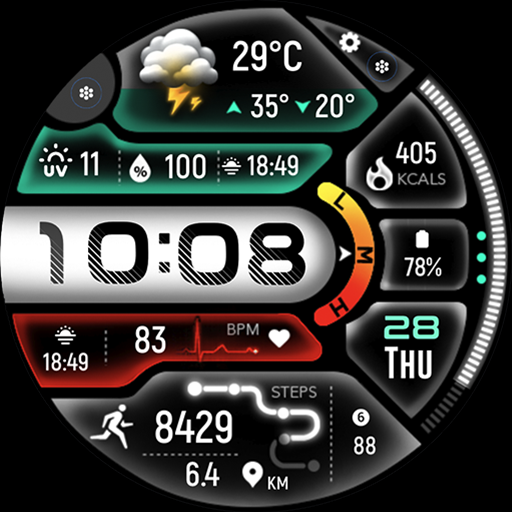
ML2U 398 Tactical Hybrid Face
Personalization
0.0
729 Descargas
"A high-data tactical watch face for Wear OS with 6 custom complications"
Instalar en Google Play
App de pago


Acerca de esta app
ML2U 398 Tactical Hybrid Face is a premium, high-performance hybrid watch face designed for those who need critical data at a glance. Built with a rugged, futuristic dashboard aesthetic, it transforms your smartwatch into a comprehensive information hub.
Key Features:
6x Customizable Complications: Tailor every corner of your screen—from weather and barometer to world clock and battery stats.
Health & Fitness: Real-time heart rate (BPM), step counter with goal progress, and distance tracking in KM/Miles.
Vibrant Themes: 20+ distinct color styles to match your tactical gear or daily outfit.
Full Date Display: Includes day of the week, number of week in year and number of day in year.
Optimized Performance: Designed for Wear OS with a battery-efficient Always-On Display (AOD).
⚠️ WEATHER TROUBLESHOOTING If the weather displays "NO INFO" or does not update, please try the following:
Method 1: Ensure the complication is set to Weather. Tap it to open the weather app, scroll to the bottom, and tap the refresh icon next to the "last updated" timestamp
Method 2: Switch to a different watch face that includes weather info, then switch back to ML2U 398.
Info de la App
Versión
Actualizado el
Sep 07, 2026
Tamaño
Requiere Android
ID del paquete
com.watchfacestudio.ml2u398
Instalaciones
729
Categoría
Personalization
Novedades
First release companion app
Permisos de la aplicación
-
Other
- Google Play license check