

Earth MOD space animated
Personalization
4.5
4.8K+ Descargas
"Astronomical watch face in a stylish design for Wear OS"
Instalar en Google Play
App de pago



Acerca de esta app
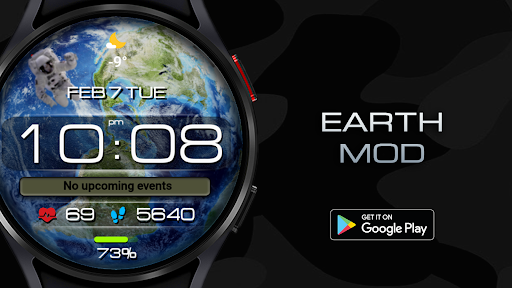
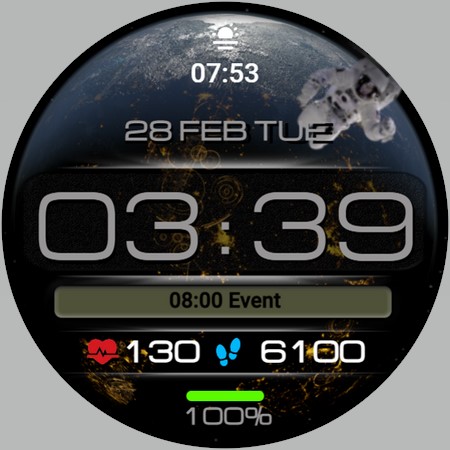
Astronomical animated watch face in a stylish design for Wear OS
Watch as the astronaut travels in orbit around the earth, the moon and other planets, the informative design and many settings make this Watch Face suitable for every day
Basic moments:
- Digital time 12 or 24 hours
- Date, week, month
- Battery
- Custom complications
- Changeable backgrounds
- AOD mode on black background
Compatible with Wear OS devices running API level 30 and above, including Samsung Galaxy Watch 4, 5, 6, 7, 8 and Pixel Watch.
**Installation**
1. Install the watch face app on your phone.
2. Make sure your Wear OS watch is connected to your phone and uses the same Google account.
3. Select your watch as the installation device and complete the installation.
4. After installation, select the watch face from your watch face gallery.
If installation is delayed, check the internet connection on both devices, wait a minute or two, or restart your watch and try again.
**Customization**
• Touch and hold the watch face, then tap **Customize** to access the available settings.
• For the best experience, we recommend configuring the watch face directly on your watch. Video guide:
https://youtu.be/YPcpvbxABiA
**Support**
If you have any questions or installation issues, please contact: [email protected]
**More watch faces by WIN**
Explore other watch faces:
https://play.google.com/store/apps/dev?id=6789054753742990227
Info de la App
Versión
Actualizado el
Oct 13, 2026
Tamaño
Requiere Android
ID del paquete
com.watchfacestudio.winearthmod
Instalaciones
4.8K+
Categoría
Personalization
Novedades
Wear OS update
- Added new custom complications (for example, probability of rain and others)
- New Watch Face format
Permisos de la aplicación
-
Other
- full network access

Calificaciones y opiniones
4.5
Calificaciones totales
5
4
3
2
1
T
Tamara Cates
Jan 18, 2026
THANK YOU JESUS CHRIST FOR THIS APP !!! IT REMINDS ME OF THE VIDEO FOREVER YOUNG.
M
Marie Reyes
Nov 02, 2025
Can't get it to work
M
Manirul Mallick
Jun 29, 2025
Superb. I like it.
C
Carlos Olguin
Nov 04, 2023
Garbage
R
Reginald Poindexter
Jun 27, 2023
Beautiful watch face! Keep up the good work!
R
Rakesh Kumar (Bablu)
Mar 30, 2023
Very nice and lovely watch


