

Zoho TeamInbox
Productivity




Acerca de esta app
You can now have other communication channels (like WhatsApp, and Telegram) right next to your emails, and enjoy all of the above said capabilities for these channels as well. No more juggling between apps and managing all your communication from a single platform.
As shared inboxes ensure transparency around group email conversations, organizations can avoid work duplication, keep important emails from falling through the cracks, distribute tasks effectively among members, and have a clutter-free inbox.
With the Zoho TeamInbox app, you can:
Assign and follow - Assign owners to threads, discuss, and invite people to contribute by @mentioning them. Follow up on tasks easily and ensure Inbox Zero.
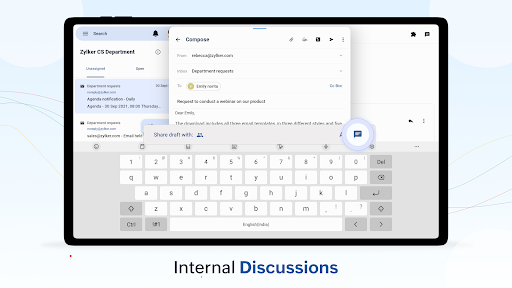
Share draft - No more back-and-forth emails only for edits. Share and draft emails together with your team with zero email forwards.
Connect personal emails - Keep your personal emails right next to your team emails. Your personal inbox is always private to you, but share specific emails with your teammates.
Snooze - With emails flooding your inbox, prioritize, and attend to emails at the right time. Snooze emails and handle them when they are important.
Conduct internal discussions - With Zoho TeamInbox, you do not have to switch to another application for collaborating. Chat with your teammates right from your inbox.
Info de la App
Permisos de la aplicación
-
Identity
- find accounts on the device
- add or remove accounts
-
Contacts
- find accounts on the device
-
Photos/Media/Files
- read the contents of your USB storage
- modify or delete the contents of your USB storage
-
Storage
- read the contents of your USB storage
- modify or delete the contents of your USB storage
-
Camera
- take pictures and videos
-
Microphone
- record audio
-
Other
- download files without notification
- receive data from Internet
- view network connections
- create accounts and set passwords
- full network access
- run at startup
- draw over other apps
- use accounts on the device
- control vibration
- prevent device from sleeping


Calificaciones y opiniones
Very very best app
When clicking send messages button through mobile app in a whatsapp shared inbox it says unexpected error. Although the messages is delivered it is very bad user experience. Also the app crashes when a new message is delivered
so good
Good
Here's the text from the image copied for you: HIGHLY RECOMMEND!! I have been using this for 3 years now and I cannot imagine my life without it. Game changer!! you can save anything you find online to personalized digital notebooks. Such a great way to stay organized too! I have one notebook called "lists" and it's like my junk drawer. In it I have weekly grocery lists (I actually use it while shopping with the box check off feature!), brain dumps, project lists and more. I've only scratched t
Amazingly made in 🇮🇳


