

Watch Face CUE145
Personalization
4.7
1.6K+ Téléchargements
"Weather watch face with UV, min/max temp, rain chance & custom options."
Installer sur Google Play
Application payante




À propos de cette app
⚠️ Note: This watch face is designed for Wear OS devices running API Level 34+ (Wear OS 5 or newer).
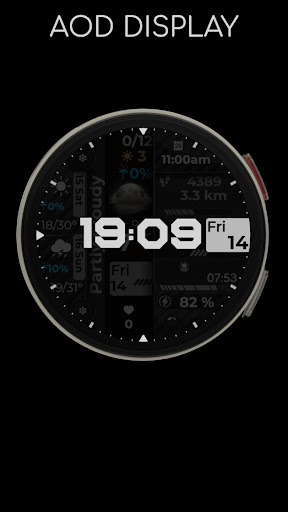
A clean, highly customizable digital watch face for Wear OS. Track your daily stats, check the weather forecast at a glance, and personalize your display with custom colors and complications.
Key Features:
▸ Time & Date: 12-hour (AM/PM) or 24-hour digital display.
▸ Health Tracking: Step counter and distance tracker (km/miles).
▸ Detailed Weather: UV index, daily temperature (min/max), precipitation chance, and a two-day forecast.
▸ Battery Status: Color-coded progress bar, low battery warning, and charging indicator.
▸ Customization: 3 custom complications, 2 app shortcuts, and multiple color themes to match your style.
▸ Localization: Weather and date automatically sync to your system's default language.
🌦️ Weather Info Not Showing?
Ensure your watch is connected to your phone via Bluetooth.
Enable location permissions in both your phone and watch settings.
Ensure the default Weather app on your watch is fully set up.
Tip: If data is delayed, switch to another watch face and back. It may take a few minutes for the initial sync.
If you encounter any installation issues or need assistance, we are happy to help.
✉️ Email: [email protected]
Info App
Version
Mis à jour le
Aug 04, 2026
Taille
Nécessite Android
ID du paquet
com.creation.cue145watchface
Installations
1.6K+
Catégorie
Personalization
Nouveautés
Updated for Wear OS target SDK 35 compatibility, performance improvements, and bug fixes.
Autorisations de l'application
-
Other
- pair with Bluetooth devices
- access Bluetooth settings
- full network access
- control vibration
- Google Play license check

Notes et avis
4.7
Notes totales
5
4
3
2
1
R
Ryan C (Weird.Wacky.UAP.Phenomena)
Jun 21, 2025
Great design and colors
M
Mike Vaughn
Feb 17, 2025
love this watch face. any way to make the time just a little bit bigger?


