BrightSide Digital Watch Face
Personalization
0.0
0 Téléchargements
"Big, easy-to-read watch face for Wear OS — customizable colors and data"
Installer sur Google Play
Application payante


À propos de cette app
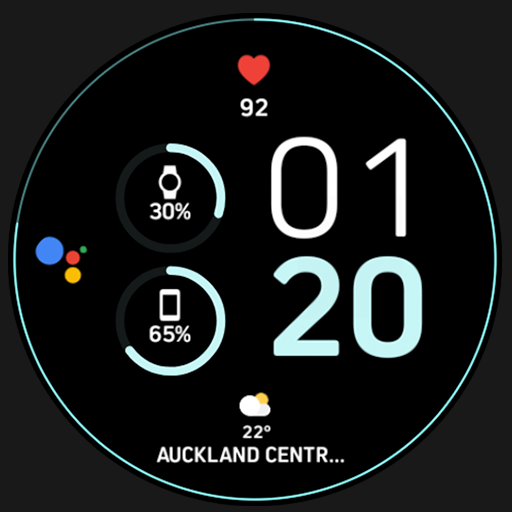
BrightSide-IOV is an elegant, customizable watch face for Wear OS. A digital dial set large and easy for anyone to read: two bars that fill towards their goal, below them two readings side by side.
The readings/metrics come from apps on your watch. The watch face only displays them, and with your watch's health and fitness app as well as a weather or calendar app there are more values to choose from.
These settings can be made either from the app or on the watch itself.
Setting them on the watch can cause trouble (metrics/data/complications pick their own tappable area) and those areas can overlap. In that case the settings have to be made from the app.
An illustrated step-by-step guide for both ways is here:
https://iovion.com/watchFaces/wearOs/settings
Features:
- Four complication slots: two bars and the two cells of the row below them
- The bars take providers that deliver a value with a range — only then is the fill height honest; the cells take any short text
- Nothing to set up first: out of the box the bars show steps and battery, the cells heart rate and sunset
- Color settings with eighteen colors each plus an "As Designed" reset
- Always-on display: only the time stays visible, hour above minute, dimmed and centered — bars and readings step back
- No permissions, no network access, no data collection
Requires Wear OS 4 or newer.
If you would like more to configure, leave a message via the contact form and we will add it.
The readings/metrics come from apps on your watch. The watch face only displays them, and with your watch's health and fitness app as well as a weather or calendar app there are more values to choose from.
These settings can be made either from the app or on the watch itself.
Setting them on the watch can cause trouble (metrics/data/complications pick their own tappable area) and those areas can overlap. In that case the settings have to be made from the app.
An illustrated step-by-step guide for both ways is here:
https://iovion.com/watchFaces/wearOs/settings
Features:
- Four complication slots: two bars and the two cells of the row below them
- The bars take providers that deliver a value with a range — only then is the fill height honest; the cells take any short text
- Nothing to set up first: out of the box the bars show steps and battery, the cells heart rate and sunset
- Color settings with eighteen colors each plus an "As Designed" reset
- Always-on display: only the time stays visible, hour above minute, dimmed and centered — bars and readings step back
- No permissions, no network access, no data collection
Requires Wear OS 4 or newer.
If you would like more to configure, leave a message via the contact form and we will add it.
Info App
Version
1.31
Mis à jour le
Oct 17, 2026
Taille
Nécessite Android
ID du paquet
com.iovion.wf.brightside
Installations
0
Catégorie
Personalization
Nouveautés
2026-10-17 - 1.31
- New color "True Black": on AMOLED watches the background switches off completely, only the dial lights up
2026-09-29 - 1.30
- The date can now be shown or hidden
2026-09-21 - 1.24
- New color settings for Clock and Data Icons
2026-09-13 - 1.22
- First release
- New color "True Black": on AMOLED watches the background switches off completely, only the dial lights up
2026-09-29 - 1.30
- The date can now be shown or hidden
2026-09-21 - 1.24
- New color settings for Clock and Data Icons
2026-09-13 - 1.22
- First release