

RedGreen Lite
Tools
0.0
35 Téléchargements
"Monitor apps, memory & device health – all in one place."



À propos de cette app
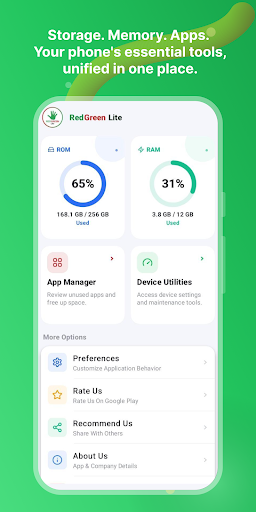
RedGreen Lite is a lightweight Android utility that helps you review installed apps, view storage and memory information, and access commonly used Android settings from one place.
Set reminders to review apps that haven't been used for 7, 15, or 30 days, then decide whether to keep or uninstall them through Android. You can also quickly open supported settings such as Wi-Fi, Hotspot, Auto Sync, and Notification Settings.
RedGreen Lite provides a simple interface for reviewing app information and accessing Android settings. All actions are initiated and confirmed by you through the Android operating system.
How RedGreen Lite Improves Your Daily Life
We all carry our phones everywhere – but most of us have no real visibility into what is happening on our own device.
You open your phone one day & storage is full. An app you haven't touched in six months is still sitting there. A setting you need is buried three menus deep.
RedGreen Lite gives you back the clarity you have been missing – before the clutter builds up.
• Spend less time digging through settings
• Know exactly which apps you're actually using
• Get timely reminders before your device gets cluttered
• Access the controls you need in seconds, not minutes
It is not about doing more. It is about knowing more – & acting on it effortlessly.
For Whom?
RedGreen Lite is perfect for:
• Everyday Android users who want a simple, no-nonsense device management tool
• Anyone tired of bloated cleaner apps that demand too many permissions & deliver too little
• Users who want quick access to device settings without navigating deep menus
• People who like staying on top of their app list before it grows out of control
• Anyone who wants storage & RAM visibility – lightweight dashboard
If you have ever thought "there should be a simpler way to manage my phone" – this is it.
Why RedGreen Lite?
Most device management apps are bloated with features you will never use, aggressive with permissions you didn't ask for, or cluttered with ads that constantly get in the way.
RedGreen Lite is different by design:
• Lightweight – won't slow your phone or drain your battery
• Transparent – clear permission explanations, no hidden behavior
• Honest – app uninstalls always require your confirmation. Always.
• Focused – built around the tools real users actually need
• No unnecessary complexity – clean design, clean purpose
This is device management you can trust.
Permissions – Clear & Honest
RedGreen Lite only requests permissions it genuinely needs:
• Usage Access – To help identify installed & inactive apps based on usage patterns
• Notification Access – To support notification-related features you choose to enable
• Notification Permission – To deliver reminders & alerts you configure
RedGreen Lite does not uninstall apps automatically. Android always requires your confirmation first.
Some features may redirect to Android system settings depending on your device manufacturer & Android version.
Simple. Lightweight. Trusted.
Built for Android users who value simplicity, transparency & control. RedGreen Lite tries to be exactly what you need – a reliable, everyday companion that helps you understand & manage your Android device better.
RedGreen Lite combines app management, storage monitoring, RAM visibility & device utility tools into one lightweight experience.
One interface. All the essentials. Zero unnecessary complexity.
Stop navigating blindly through your own phone.
RedGreen Lite gives you the clarity, control & convenience you deserve – in the lightest package possible.
Download RedGreen Lite free today & take control of your Android.
More features coming soon. Stay tuned for upcoming updates.
Info App
Version
Mis à jour le
N/A
Taille
Nécessite Android
ID du paquet
com.unfoldlabs.redgreenlite
Installations
35
Catégorie
Tools
Autorisations de l'application
-
Wi-Fi connection information
- view Wi-Fi connections
-
Other
- update component usage statistics
- view network connections
- connect and disconnect from Wi-Fi
- full network access
- read sync settings
- prevent device from sleeping
- toggle sync on and off
- Google Play license check


Notes et avis
0.0
Notes totales
5
4
3
2
1
r
ram mandoti
Jun 30, 2026
Excellent...
Applications similaires

MentalFuture: CBT Hypnotherapy
Mental Future for Meditation, CBT and Sleep
3.8

WEquil App
WEquil app
4.1

AI Journal & Clarity : DiaryIt
vinztech.app
4.3

DBT-Mind - The DBT App
Timo Scholz-Fritsch
3.7

Sesame Search & Shortcuts
Nova Launcher
3.7

Joylux Menopausal Health App
JoyluxDev
4.6


