

UsA Florencia - USA111
Personalization




À propos de cette app
This watch face requires Wear OS API 33+ (Wear OS 4 or newer). Compatible with Galaxy Watch 4/5/6/7/8 Series and newer, Pixel Watch series and other watch face with Wear OS 4 or newer.
Features:
- 12/24 hour digital analog style
- Battery Information with gauge
- Heart rate with gauge
- Customize menu for easy styling
- Customize minute and seconds blade style
- Customize gauge and hour color style
- Custom app shortcuts
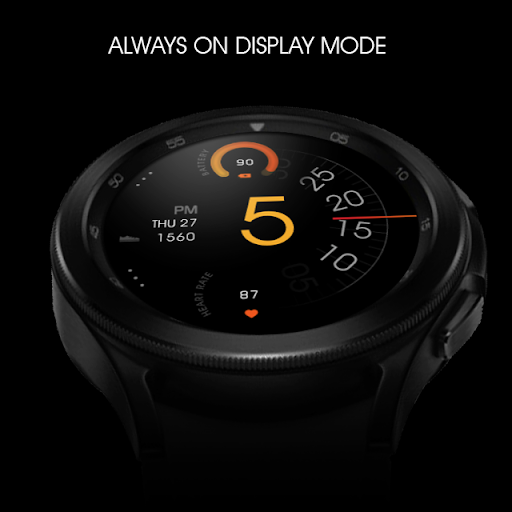
- Special Designed AOD, digit color synced with normal mode
Make sure you are purchasing using the same Google account registered on your watch. The installation should begin automatically on the watch after a few moments.
After the installation is completed on your watch, do these steps to open the watch face on your watch :
1. Open the watch face list on your watch (tap and hold the current watch face)
2. Scroll to the right and tap "add watch face"
3. Scroll down and find new installed watch face in the "downloaded" section
Tap and hold the watch face and go to the "customize" menu (or settings icon under the watch face) to change the styles and also manage the custom shortcut complication.
The heart rate is now synced with the built-in heart rate settings including the measurement interval.
To change between 12 or 24-hour mode, go to your phone date and time settings and there is an option to use 24-hour mode or 12-hour mode. The watch will sync with your new settings after a few moments.
Special designed Always On Display ambient mode. Turn on the Always On Display mode on your watch settings to show a low power display on idle. Please be aware, this feature will use more batteries.
Join our Telegram group for live support and discussion
https://t.me/usadesignwatchface
Info App
Nouveautés
Notes et avis
Beautiful and great looking watchface, let down by an ugly AOD mode (background color turns black). Avoid if you're an AOD fan. So overall I rate it 2 stars out of 5 for the effort. Dev, do better.
Heart Rate complication doesn't work
Heart rate monitor keeps freezing till I swap watch faces. Support has ignored me for near a month.
Heart rate won't work
Nice
The watch face is not appearing in my galaxy 4 watch faces options. Have waited 24 hours and nothing. I tried the advice saying to try from the website and I get a message saying it's been downloaded to my phone, but it's not visible anywhere.


