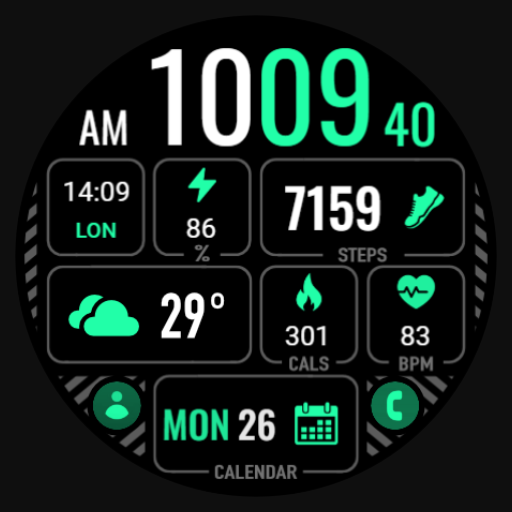
【Digital】Eye Protection Green
Personalization
0.0
239 Téléchargements
"The Watch supports running on Wear OS"
Installer sur Google Play
Application payante


À propos de cette app
The Watch supports running on Wear OS
🏠Other my works here:
https://play.google.com/store/apps/dev?id=9082617204511160070
Hope you leave a positive review for this watch!
【BOGO】Please send the following content to my email: [email protected]
[Order ID: GPA.××××-××××-××××-×××××
Name of the complimentary Watch:××]
I will send you free coupons within a week.
⌚️Instagram :
https://www.instagram.com/zkinwatchfaces?igsh=OHNuOHExbGliYWtm
🎁Telegram:
https://t.me/zkinwatch
Attributes: Custom, Multi functional, Widget, Eye Protection, Fluorescent, Green
1.Left: AMPM, Date, Custom App, Time, Week, Seconds
2.Central: Messages, Custom Data, Distance, Heart rate, Battery, Settings
3.Right: Steps and progress bar, Calories and progress bar
Customization: Multiple customization areas are available for selection
Compatible devices: Galaxy Watch 4/5/6/7/8 and other devices that support Wear OS
How do I install the watch face on WearOS ?
1. Install it from Google Play Wear Store on your watch
2. Install the companion app for fully customization (Android phone devices)
🏠Other my works here:
https://play.google.com/store/apps/dev?id=9082617204511160070
Hope you leave a positive review for this watch!
【BOGO】Please send the following content to my email: [email protected]
[Order ID: GPA.××××-××××-××××-×××××
Name of the complimentary Watch:××]
I will send you free coupons within a week.
⌚️Instagram :
https://www.instagram.com/zkinwatchfaces?igsh=OHNuOHExbGliYWtm
🎁Telegram:
https://t.me/zkinwatch
Attributes: Custom, Multi functional, Widget, Eye Protection, Fluorescent, Green
1.Left: AMPM, Date, Custom App, Time, Week, Seconds
2.Central: Messages, Custom Data, Distance, Heart rate, Battery, Settings
3.Right: Steps and progress bar, Calories and progress bar
Customization: Multiple customization areas are available for selection
Compatible devices: Galaxy Watch 4/5/6/7/8 and other devices that support Wear OS
How do I install the watch face on WearOS ?
1. Install it from Google Play Wear Store on your watch
2. Install the companion app for fully customization (Android phone devices)
Info App
Version
Mis à jour le
Oct 12, 2026
Taille
Nécessite Android
ID du paquet
com.watchfacestudio.EyeProtectionGreen
Installations
239
Catégorie
Personalization
Nouveautés
Release a new watch companion to help quickly install watch face on mobile devices.
More watch faces: https://zkinwatchfaces.com/
More watch faces: https://zkinwatchfaces.com/
Autorisations de l'application
-
Other
- Google Play license check