

Fantasy Blue LCD For Wear OS
Personalization
0.0
2 Téléchargements
"These watch faces run on Wear OS"
Installer sur Google Play
Application payante




À propos de cette app
Fantasy Blue LCD For Wear OS
These watch faces run on Wear OS
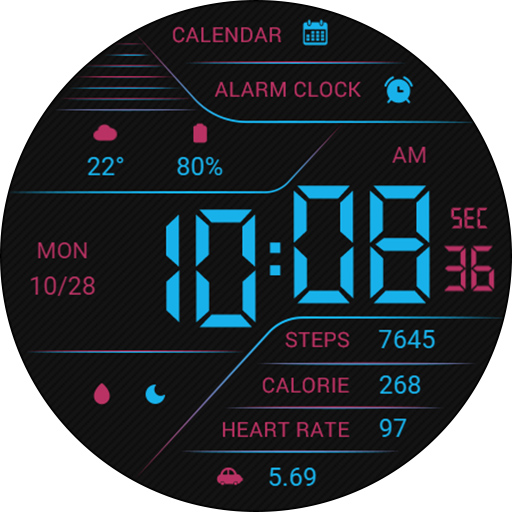
1. Top: Calendar, Alarm Clock, Custom Data;
2. Central region: week, date, time, morning and afternoon;
3. Bottom: Customize app, steps, calories, heart rate, distance.
Customization: Multiple customization areas are available for selection
Compatible devices: Pixel Watch, Galaxy Watch 4/5/6/7 and above, and other devices
How do I install the watch face on WearOS ?
1. Install it from Google Play Wear Store on your watch
2. Install the companion app for fully customization (Android phone devices)
Info App
Version
Mis à jour le
Oct 06, 2026
Taille
Nécessite Android
ID du paquet
com.watchfacestudio.FantasyBlueLCD
Installations
2
Catégorie
Personalization
Nouveautés
Update: Support for higher versions
More watch faces: https://zkinwatchfaces.com/
Autorisations de l'application
-
Other
- Google Play license check


