

CELEST5476 Minimalist Watch
Personalization
0.0
125 Téléchargements
"Typographic digital watch face with stacked date, time & 11 accent colors."
Installer sur Google Play
Application payante






À propos de cette app
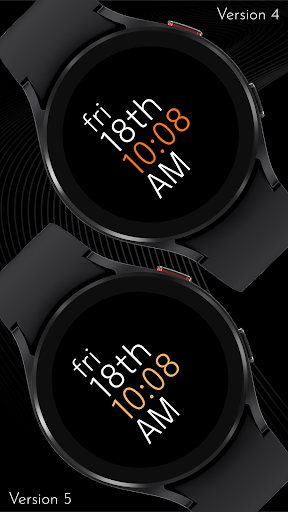
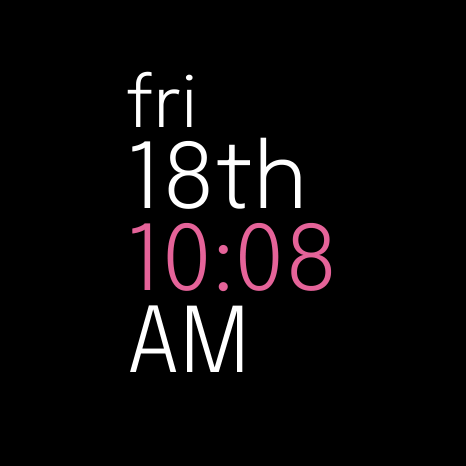
Digital and typographic: CELEST5476 Minimalist Watch stacks the weekday, the date, the time, and the AM/PM marker down the left of a black dial and leaves the rest of the screen empty.
Everything is set in one clean sans-serif, left-aligned, with the time picked out in your accent color and the rest in white. The date reads as an ordinal — 18th rather than 18 — which is a small thing that makes the whole stack read like a line of text instead of a readout. Eleven accent colors set the time, and four circular complications can be added when you want data, or left off entirely if you would rather keep the space.
🔤 Features
- Digital time stacked with the weekday, date, and AM/PM marker
- Ordinal date styling
- Time set in your chosen accent color
- Four optional circular complications
🎨 Customization
- 11 accent color options
- 4 optional circular complications
✅ Compatible Devices
- Google Pixel Watch/2/3/4/5
- OnePlus Watch 2/2R/3/4
- Oppo Watch X2/X3
- Samsung Galaxy Watch 4/4 Classic/5/5 Pro/6/6 Classic/7/8/8 Classic/9/FE/Ultra (2024)/(2025)/Ultra 2
- Xiaomi Watch 2/2 Pro/5
🎁 BOGO Promotion: https://celest-watches.com/bogo/
✨ Explore the complete CELEST collection in one place — including all Wear OS, HUAWEI, and Apple Watch faces, along with our apps and tools — with the CELEST Catalog app: https://play.google.com/store/apps/details?id=com.celestwatches.catalog
🔧 Installation Help
Having trouble? We've got you covered:
- Use the dropdown menu next to "Install" on your phone to select your watch model or install directly from your watch's Play Store app.
- Updating weather data (if the watch face shows weather) may take time after installation but switching to another watch face and switching back or restarting both the watch and phone usually helps.
- Check out our installation and troubleshooting guide: https://celest-watches.com/installation-troubleshooting/
- Contact us at [email protected] for quick support
📞 Support & Community
📧 Support: [email protected]
📱 Follow @celestwatches on Instagram and subscribe to our newsletter to get notified of new releases and deals: https://celest-watches.com/newsletter/
Info App
Version
Mis à jour le
Aug 05, 2026
Taille
Nécessite Android
ID du paquet
com.watchfacestudio.celest5476
Installations
125
Catégorie
Personalization
Nouveautés
Updated to target Android 16 (API 36).
Autorisations de l'application
-
Other
- view network connections
- full network access

Notes et avis
0.0
Notes totales
5
4
3
2
1
S
Steve May
Oct 29, 2023
Superb minimal design. Great choice of colours too. Highly recommended!


