

Multi Function Digital Iris538
Personalization
0.0
78 Téléchargements
"Iris538 Classic digital with high visibility and contemporary features"
Installer sur Google Play
Application payante




À propos de cette app
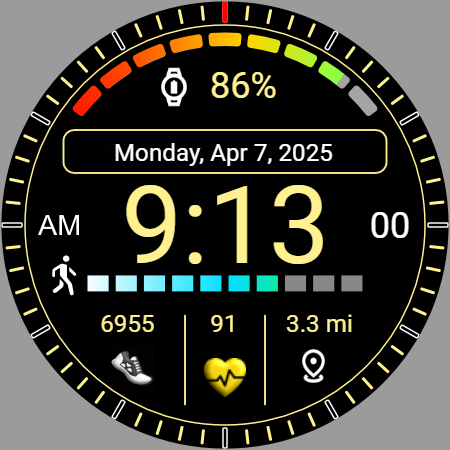
Iris538 is a multi-function watch face with stylish options that blend functionality with customization. Its main purpose is for high visibility and information. It is designed for Android watches using API level 34 and above.
👀 Here’s a detailed overview of its features:
⌚Key Features:
• Time & Date Display: Displays the current digital time along with the day, month, date and year.
• Digital Clock: The digital time has the option to be displayed with or without the leading zero. 12- or 24-hour time matches your phone setting
• Battery Information: Shows the battery percentage along with a progress bar helping users keep track of their device's power status.
• Step Count: Counts your step count throughout the day.
• Step Goal: Step goal is displayed with a progress bar.
• Custom: Distanced walked is displayed in Miles or Kilometers and is selectable in the custom setting. Another option is to display the current weather temperature.
• Heart Rate: Heart rate is displayed with change icon color for low, regular and high heart rate.
• App Short-cuts: The watch face has a total of 6 shortcuts. 4 Set and 2 selectable.
⌚Customization Options:
• Color Themes: You will have 10 color themes to choose from to change the look of the watch.
• Index: You have 4 different indexes including a tachymeter to help customize the watch face.
⌚Always-On Display (AOD):
• Limited Features for Battery Saving: The Always-On Display reduces power consumption by displaying fewer features and simpler colors compared to the full watch face.
• Theme Syncing: The color theme you set for the main watch face will also be applied to the Always-On Display for a consistent look.
⌚Compatibility:
• Compatibility: This watch face is compatible with Android watches using API level 34 and above.
• Wear OS Only: Iris538 watch face is designed specifically for Smart Watches using Wear OS operating system.
• Cross-Platform Variability: While the core features like time, date, and battery information are consistent across devices, certain features (such as AOD, theme customization, and shortcuts) may behave differently depending on the specific hardware or software version of the device.
❗Language Support:
• Multiple Languages: The watch face supports a wide range of languages. However, due to varying text sizes and language styles, some languages might slightly alter the visual appearance of the watch face.
❗Additional Information:
• Instagram: https://www.instagram.com/iris.watchfaces/
• Website: https://free-5181333.webadorsite.com/
• Using the companion app for installation: https://www.youtube.com/watch?v=IpDCxGt9YTI
❗Samsung Users:
Note for Galaxy Watch Users: The watch face editor in the Samsung Wearable app often fails to load complex watch faces to customize. This is not an issue with the watch face itself.
It is recommended if you have this problem, you can customize the watch face directly on the watch until Samsung resolves this issue. All features can be changed using this method.
Iris538 masterfully blends classic digital watch face aesthetics with contemporary features, making it a standout choice for users who value both form and function. Designed for high visibility and ease of viewing, it offers a stylish and practical solution for everyday wear. With its sleek design and user-friendly display, Iris538 provides a versatile option for those seeking both fashion and utility in a single device.
👀 Here’s a detailed overview of its features:
⌚Key Features:
• Time & Date Display: Displays the current digital time along with the day, month, date and year.
• Digital Clock: The digital time has the option to be displayed with or without the leading zero. 12- or 24-hour time matches your phone setting
• Battery Information: Shows the battery percentage along with a progress bar helping users keep track of their device's power status.
• Step Count: Counts your step count throughout the day.
• Step Goal: Step goal is displayed with a progress bar.
• Custom: Distanced walked is displayed in Miles or Kilometers and is selectable in the custom setting. Another option is to display the current weather temperature.
• Heart Rate: Heart rate is displayed with change icon color for low, regular and high heart rate.
• App Short-cuts: The watch face has a total of 6 shortcuts. 4 Set and 2 selectable.
⌚Customization Options:
• Color Themes: You will have 10 color themes to choose from to change the look of the watch.
• Index: You have 4 different indexes including a tachymeter to help customize the watch face.
⌚Always-On Display (AOD):
• Limited Features for Battery Saving: The Always-On Display reduces power consumption by displaying fewer features and simpler colors compared to the full watch face.
• Theme Syncing: The color theme you set for the main watch face will also be applied to the Always-On Display for a consistent look.
⌚Compatibility:
• Compatibility: This watch face is compatible with Android watches using API level 34 and above.
• Wear OS Only: Iris538 watch face is designed specifically for Smart Watches using Wear OS operating system.
• Cross-Platform Variability: While the core features like time, date, and battery information are consistent across devices, certain features (such as AOD, theme customization, and shortcuts) may behave differently depending on the specific hardware or software version of the device.
❗Language Support:
• Multiple Languages: The watch face supports a wide range of languages. However, due to varying text sizes and language styles, some languages might slightly alter the visual appearance of the watch face.
❗Additional Information:
• Instagram: https://www.instagram.com/iris.watchfaces/
• Website: https://free-5181333.webadorsite.com/
• Using the companion app for installation: https://www.youtube.com/watch?v=IpDCxGt9YTI
❗Samsung Users:
Note for Galaxy Watch Users: The watch face editor in the Samsung Wearable app often fails to load complex watch faces to customize. This is not an issue with the watch face itself.
It is recommended if you have this problem, you can customize the watch face directly on the watch until Samsung resolves this issue. All features can be changed using this method.
Iris538 masterfully blends classic digital watch face aesthetics with contemporary features, making it a standout choice for users who value both form and function. Designed for high visibility and ease of viewing, it offers a stylish and practical solution for everyday wear. With its sleek design and user-friendly display, Iris538 provides a versatile option for those seeking both fashion and utility in a single device.
Info App
Version
Mis à jour le
Sep 03, 2026
Taille
Nécessite Android
ID du paquet
com.watchfacestudio.iris538
Installations
78
Catégorie
Personalization
Nouveautés
This watch face is designed for Wear OS style smartwatches only. It will not install or function on non-compatible devices.
Notes et avis
0.0
Notes totales
5
4
3
2
1
T
Tania bowen
Jun 06, 2025
all the ones I have paid for and they have taken money for watch faces haven't loaded the free ones no problem not rating any stars at mo


