

Premium Info - Watch Face
Personalization



על אפליקציה זו
[ Only for Wear OS devices - API 33+ ]
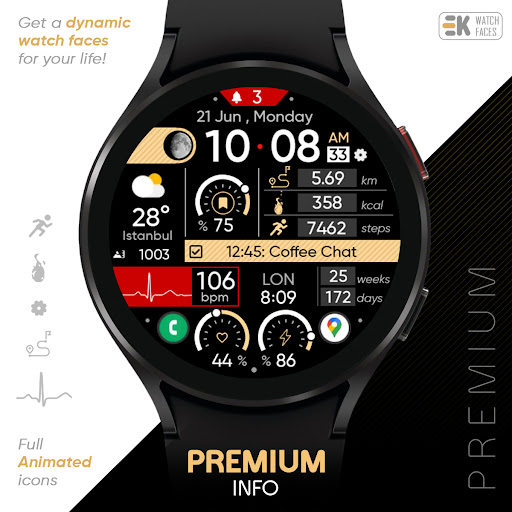
🚀 Get a dynamic watch face for your life..
FEATURES
● 📺 Full animated Icons
● 🎨 20 colours variants
● 🌕 Live moon phases
● 🕒 12/24 H (Based on your phone time setting)
● 🚧 Km/Mil supported (Automatically selected based on phone language (in United States and United Kingdom))
● 📊 Steps - Distance - Calories - Battery - Heart rate (On wrist) - 2 custom complications - Dual time - Days in year - Calendar - 3 shortcuts - Unread notification count
● 👀 Always on display supported
● ⚡ Charging animation
📌 INSTALLATION NOTES:
1 - 🔗 Ensure your watch is properly connected to your phone. Open the Phone App on your phone and tap on "DOWNLOAD TO THE WATCH", then follow the instructions on your watch.
⌛ A few minutes after tapping the install button on your watch, the watch face will be installed. You can then select your new watch face!
📱 The phone app serves as a placeholder to make it easier to install and find the watch face on your Wear OS device.
⚠️ Note: If you find yourself stuck in a payment loop, don’t worry! You will only be charged once, even if prompted to pay again. Wait 5 minutes or restart your watch and try again. This could be a synchronization issue between your device and Google servers.
2 - 💻 Alternatively, you can try installing the watch face from a web browser on your PC.
⚠️ Please note that any issues on this side are NOT developer-dependent. The developer has no control over the Play Store from this side. Thank you.
🔑 For full functionality, please manually enable Sensors & receive complication data permissions!
WEB
https://www.ekwatchfaces.com
https://www.instagram.com/ekwatchfaces
https://www.facebook.com/ekwatchfaces
https://twitter.com/ekwatchfaces
https://www.pinterest.com/ekwatchfaces
YOUTUBE
https://bit.ly/2TowlDE
מידע על האפליקציה
מה חדש
הרשאות אפליקציה
-
Other
- pair with Bluetooth devices
- access Bluetooth settings
- control vibration
- Google Play license check

דירוגים וביקורות
Doesn't show built in weather icon? Instead of telling me to email you, read and fix the issue as per review comment then I'll change the feedback??
Killer watch face! If you want to watch face that Tony Stark would use this is the one.
Very informative and stylish at the same time. It keeps a professional look while maintaining an easy-to-read UI. It's almost mesmerizing to look at because of the animations. I don't have to look at it long to find the info I'm looking for (even though I do want to look at it longer lol, I even increased my screen time settings just so I can😁). Two issues, though: I wish I could change the background color as well, and I can't see the current weather icon, only the temperature and location.⛅️
Thank you EK for your support!
I have installed this face, and I must say this is the best watch face I have used to date. If you like digital display and want lots of info readily available, you must go for it. 5 Stars to developer. Using it for Galaxy watch 6 classic 47mm.
Outstanding watch face , absolutely stunning thank you so much bro


