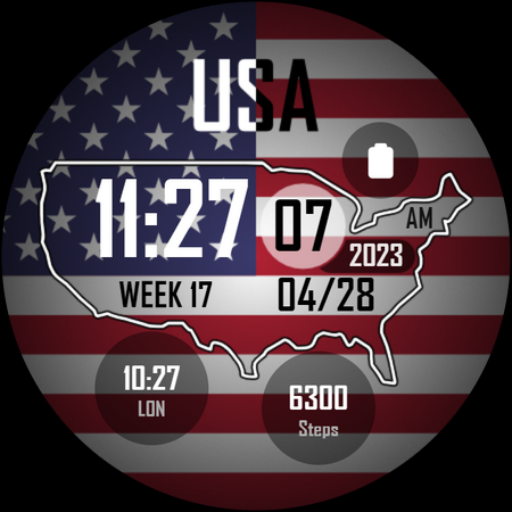
4th of July Watch - ReS42
Personalization
4.8
477 הורדות
"Wear Os Watch Face - Independence Day - Happy 4th of July"
התקן ב-Google Play
Paid App


על אפליקציה זו
Celebrate the 4th of July and Independence Day with our festive Wear OS watch face! Adorned with patriotic icons. it's perfect for showing your American pride. 🇺🇸🎇🎆
⌚Powered by Watch Face Format
⚙️ Phone App Features
The phone app is simply a tool to facilitate installation and locating the watch face on your Wear OS watch. Only the mobile app contains ads.
⚙️ Watch Face Features
• 12/24h Digital Time
• Date
• Battery
• Steps Count
• 2x Complications
• 2x Shortcuts
• Always ON Display
🎨 Complications
Touch and hold display to open customization mode. You can customize the field with any data you want.
🔋 Battery
For better battery performance of the watch, we recommend disabling the "Always On Display" mode.
✅ Compatible devices include API level 33+ Google Pixel, Galaxy Watch 4, 5, 6, 7 and other Wear OS models.
Installation and troubleshooting
Follow this link: https://www.recreative-watch.com/help/#installation-methodes
Watch faces don't automatically apply on your watch screen after the installation. That's why you must set it on your watch's screen.
💌 Write to [email protected] for assistance.
⌚Powered by Watch Face Format
⚙️ Phone App Features
The phone app is simply a tool to facilitate installation and locating the watch face on your Wear OS watch. Only the mobile app contains ads.
⚙️ Watch Face Features
• 12/24h Digital Time
• Date
• Battery
• Steps Count
• 2x Complications
• 2x Shortcuts
• Always ON Display
🎨 Complications
Touch and hold display to open customization mode. You can customize the field with any data you want.
🔋 Battery
For better battery performance of the watch, we recommend disabling the "Always On Display" mode.
✅ Compatible devices include API level 33+ Google Pixel, Galaxy Watch 4, 5, 6, 7 and other Wear OS models.
Installation and troubleshooting
Follow this link: https://www.recreative-watch.com/help/#installation-methodes
Watch faces don't automatically apply on your watch screen after the installation. That's why you must set it on your watch's screen.
💌 Write to [email protected] for assistance.
מידע על האפליקציה
גרסה
עודכן בתאריך
Aug 25, 2025
גודל
דורש אנדרואיד
מזהה חבילה
com.recreative.reseasonal42
התקנות
477
קטגוריה
Personalization
הרשאות אפליקציה
-
Other
- receive data from Internet
- view network connections
- full network access
- prevent device from sleeping