

Samsung Mobile Print
Productivity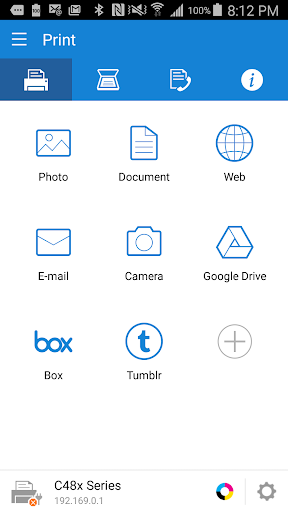


על אפליקציה זו
Samsung Mobile Print empowers to print or send fax, most of the digital contents like Office documents, PDF, images, emails, web pages or even the contents on your social network sites.
Let your content be on your phone or on Google drive it’s just easy.
It also supports scanning from your network multi-functional device and saving in various formats like pdf, jpg or png. Sharing your scanned documents is just a click away.
Key Features
> Intuitive action bar style user interface.
> Automatic discovery of supported network devices.
> Select multiple images, tap to crop or rotate.
> Supports multiple image sizes and multiple images on a page.
> Print or send fax documents/emails/email attachments/web pages/images.
> Supports contents at Google Drive, Dropbox, Evernote, OneDrive, Box and Facebook.
> Scan from flatbed or ADF and save as PDF, PNG, JPG.
> Print or Scan pages as big as A3*.
> Share to open any of the supported content from any other App.
> For corporate environment, supports security features like Job Accounting, Confidential Print and Secure Release.
> Integration support for Auto Toner Ordering Service (US and UK)
> Integration support for following printer's Wi-Fi setup (M2020/2070/283x/288x/262x/282x/267x/287x/301x/306x Series, CLP-360 Series, CLX-330x Series, C410/460/430/480 Series)
**Supports Only Samsung Printers**
* Scanning and sending fax is supported only on supported N/W printers.
* Printing can be done on printers connected via Print server or Shared.
* Maximum print and scan size would depend on the media size supported by the device.
* If you use the CJX-1050W/CJX-2000FW printer, please install "" Samsung Mobile Print Photo"" instead this app.
Supported Model List
* M2020/2070/283x/288x/262x/282x/267x/287x/4370/5370/4580 Series
* C410/460/1810/1860/2620/2670/140x/145x/4820 Series
* CLP-300/31x/32x/350/360/610/620/660/670/680/770/775 Series
* CLX-216x/316x/317x/318x/838x/854x/9252/9352/92x1/93x1 Series
* ML-1865W/2150/2160/2165/2250/2525/257x/2580/285x/2950/305x/3300/347x/331x/371x/405x/455x/551x/651x Series
* SCX-1490/2000/320x/340x/4623/4x21/4x24/4x26/4x28/470x/472x/4x33/5x35/5x37/6545/6555/8030/8040/8123/8128 Series
* SF-650, SF-760 Series
Permission Details:
Below are the details about the permissions Samsung Mobile Print app is using.
. STORAGE : To print photos and files.
. LOCATION : Location permission is required to search for nearby Wi-Fi Direct printers.
. NFC : For direct connection between mobile device and Printer.
. CAMERA : To use Camera.
. INTERNET: For any network communication.
. READ_CONTACTS: For selecting Fax number from Address book.
. GET_ACCOUNTS: For showing registered accounts in email printing and printing contents from Google drive.
. USE_CREDENTIALS: For printing from Google Drive.
. VIBRATION : To notify when NFC tag was read properly
מידע על האפליקציה
מה חדש
2. Bug fix.
הרשאות אפליקציה
-
Identity
- find accounts on the device
-
Contacts
- find accounts on the device
- read your contacts
- modify your contacts
-
Location
- precise location (GPS and network-based)
-
Photos/Media/Files
- read the contents of your USB storage
-
Storage
- read the contents of your USB storage
-
Camera
- take pictures and videos
-
Wi-Fi connection information
- view Wi-Fi connections
-
Other
- receive data from Internet
- view network connections
- change network connectivity
- allow Wi-Fi Multicast reception
- connect and disconnect from Wi-Fi
- full network access
- control Near Field Communication
- use accounts on the device
- control vibration
- prevent device from sleeping


דירוגים וביקורות
Sometimes it connects to the printer and sometimes not, even in the same day, once it works, once it hangs. My printer type is M2020w
Easy. prints quickly without hassle.
This app has some bad problems. when it connects it works great, however it doesn't connect many mamy times before it does. I really expect more stability out of this.
foshalom
Doesn't work. Samsung phone, Samsung printer... can't connect to each other
needs too many bloat extra installs


