

Bloomy Time Watch Face
Personalization
0.0
654 הורדות
"Beautiful Floral feminine watch face. Modern and elegant design."
התקן ב-Google Play
Paid App




על אפליקציה זו
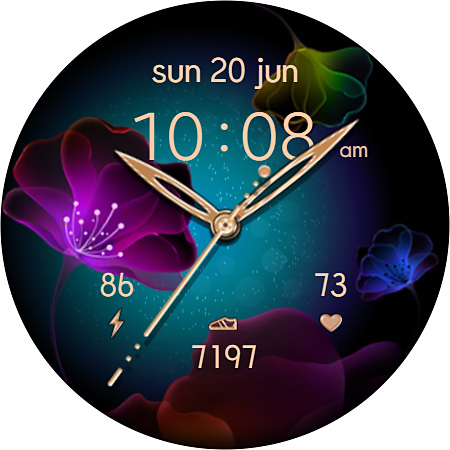
Bloomy Time is a beautiful and informative watch face for Wear OS.
Elegant moving effect is battery friendly.
Analog time + Digital time HH:MM (12/24 AUTO-sync with your Phone time)
No leading '0' in HH of 12hr time mode.
10 Beautiful Floral Themes. Easy way to select the one you prefer. Check the Themes screen for more details.
The face includes a Set of the useful Widgets and Shortcuts.
Active mode FEATURES
- 10 Color Themes
- Analog Time
- 12/24 Digital time HH:MM (auto-sync with your phone time)
- No leading '0' in HH of 12hr time
- Day of Week/Date/Month
- Battery %
- Battery Status Shortcut
- Step counter
- SHealth Shortcut
- Heart Rate
Always-On FEATURES
- 12/24 Digital time HH:MM
- Day of Week/Date/Month (7 languages supported)
- Battery %
- Step counter
- Heart Rate
NOTE: sometimes Installation from Google store to your watch might delay. If a watch face doesn't appear on your watch in a few minutes You might try to install it Directly from your Watch: swipe up, tap Google play icon, search "Bloomy Time" from Play Store on the watch and hit “Install” button. That way a WF would be downloaded directly to your watch.
Please feel free to email us if you need help with the WF.
Elegant moving effect is battery friendly.
Analog time + Digital time HH:MM (12/24 AUTO-sync with your Phone time)
No leading '0' in HH of 12hr time mode.
10 Beautiful Floral Themes. Easy way to select the one you prefer. Check the Themes screen for more details.
The face includes a Set of the useful Widgets and Shortcuts.
Active mode FEATURES
- 10 Color Themes
- Analog Time
- 12/24 Digital time HH:MM (auto-sync with your phone time)
- No leading '0' in HH of 12hr time
- Day of Week/Date/Month
- Battery %
- Battery Status Shortcut
- Step counter
- SHealth Shortcut
- Heart Rate
Always-On FEATURES
- 12/24 Digital time HH:MM
- Day of Week/Date/Month (7 languages supported)
- Battery %
- Step counter
- Heart Rate
NOTE: sometimes Installation from Google store to your watch might delay. If a watch face doesn't appear on your watch in a few minutes You might try to install it Directly from your Watch: swipe up, tap Google play icon, search "Bloomy Time" from Play Store on the watch and hit “Install” button. That way a WF would be downloaded directly to your watch.
Please feel free to email us if you need help with the WF.
מידע על האפליקציה
גרסה
עודכן בתאריך
Aug 28, 2024
גודל
דורש אנדרואיד
מזהה חבילה
com.talex.bloomy_time
התקנות
654
קטגוריה
Personalization
מה חדש
Updated with new SDK version
הרשאות אפליקציה
-
Wearable sensors/Activity data
- body sensors (like heart rate monitors)
-
Other
- reorder running apps
- control vibration
- prevent device from sleeping


דירוגים וביקורות
0.0
סך הכל דירוגים
5
4
3
2
1
C
Christie Hugaboom
Jul 21, 2022
Very pretty, I like all the color options :)


