

Vintage duckling ZKin Watch
Comics
0.0
60 הורדות
"The Watch supports running on Wear OS"
התקן ב-Google Play
Paid App


על אפליקציה זו
The Watch supports running on Wear OS
Hope you leave a positive review for this watch!
🏠Other my works here:
https://play.google.com/store/apps/dev?id=9082617204511160070
🎁Add Telegram group to obtain remaining coupons :
https://t.me/zkinwatch
⌚️Instagram :
https://www.instagram.com/zkinwatchfaces?igsh=OHNuOHExbGliYWtm
⌚️Facebook :
https://www.facebook.com/share/1YFxgRMiqf/
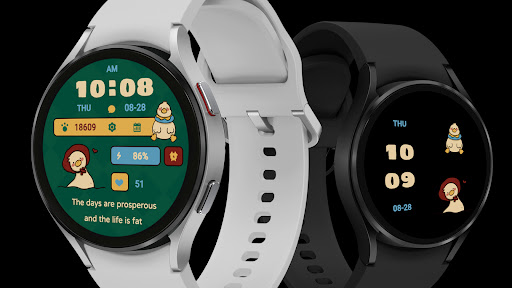
1. Top: Morning and afternoon, Time, Week, SMS, Date
2. Central: Steps, Settings, Calendar, Battery, Alarm Clock
3. Bottom: Heart rate
Compatible devices: Galaxy Watch 4/5/6/7/8 and other devices that support Wear OS
How do I install the watch face on WearOS ?
1. Install it from Google Play Wear Store on your watch
2. Install the companion app for fully customization (Android phone devices)
מידע על האפליקציה
גרסה
עודכן בתאריך
Oct 26, 2026
גודל
דורש אנדרואיד
מזהה חבילה
com.watchface.Vintageduckling450
התקנות
60
קטגוריה
Comics
מה חדש
Update: Support for higher versions
More watch faces: https://zkinwatchfaces.com/
הרשאות אפליקציה
-
Other
- Google Play license check


