

Tentang aplikasi ini
-- -- -- -- -- --
Rediscover the joy of capturing life’s moments in photographs you will immediately treasure and want to share.
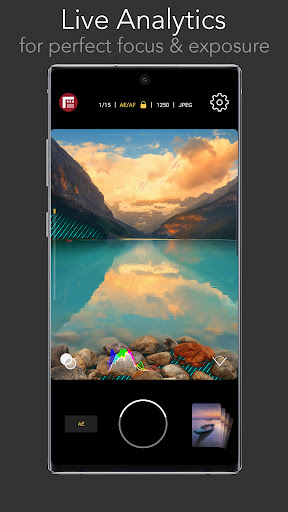
Firstlight combines custom film simulations, adaptive film grain and Filmic Pro’s famous live analytics to offer an advanced but approachable front end camera experience like no other.
Fast, easy and intuitive, Firstlight lets you envision and capture your best moments in camera, without having to spend hours editing your photos later. Shoot and share, it’s that easy.
-- -- -- -- -- --
ADVANCED IMAGE CONTROLS
- Fast, intuitive focus and exposure controls: Tap the screen to set focus/exposure, tap again to lock
- AE Mode: Included is our proprietary Auto Exposure mode for setting shutter/iso combination
- Cross-swipe manual controls: The most intuitive way to manually adjust focus and exposure. Swipe across the image to dial in your perfect shot. Swipe up and down to adjust exposure. Swipe left and right to adjust focus.
- Reactive analytics: A foundation feature of Filmic Pro and now in a photo app. Manually adjusting your focus and exposure will automatically apply focus peaking or zebra stripes to make sure you get your shot just right.
- RGB Histogram: Dynamically shows the exposure profile of the image across all color channels.
GET THE LOOK YOU WANT
- Vintage film simulations: The magic of Firstlight is in our realistic tributes to authentic film stocks. A range of film simulations are included for free with the app.
- Film grain: Apply natural looking film grain effects to give your photos that ‘film look’. Medium grain is included as a free option.
- Vignette: Apply a subtle dark vignette to your image. Medium vignette is included as a free option.
- Lens selector: Quickly switch between all available lenses on your device. (Note: camera/lens support is device specific).
PROFESSIONAL CAMERA TOOLS
- Burst mode
- Timer
- Flash
- Grid overlays
- Aspect ratios: 4:3, 16:9, 3:2, 1:1, 5:4
- JPG or HEIC Selection
- HDR control (on supported devices only)
- Volume button shutter and support for most bluetooth camera shutter remotes
- Filmic Pro quick launch button (for owners of Filmic Pro)
FIRSTLIGHT PREMIUM (with in-app purchase)
Upgrade to unlock the full potential of Firstlight with the following capabilities:
- Shutter and ISO priority modes: In addition to AE you can set specific Shutter Speed or ISO values to adhere to and let the app automatically adjust exposure for the unlocked value.
- Expanded film simulation options: More realistic film simulations and more to be added in the future for paid subscribers.
- Film grain: Fine, coarse and ISO adaptive options in addition to medium
- Adjustable vignette: Low and heavy options in addition to medium.
- Configurable burst mode
- Anamorphic adapter support
- RAW: DNG and TIFF formats
- Custom Function button
- Custom live analytics
- Configurable Focus and Exposure controls
- Embedded copyright
Info Aplikasi
Apa yang Baru
Izin Aplikasi
-
Location
- approximate location (network-based)
- precise location (GPS and network-based)
-
Phone
- read phone status and identity
-
Photos/Media/Files
- read the contents of your USB storage
- modify or delete the contents of your USB storage
-
Storage
- read the contents of your USB storage
- modify or delete the contents of your USB storage
-
Camera
- take pictures and videos
-
Wi-Fi connection information
- view Wi-Fi connections
-
Device ID & call information
- read phone status and identity
-
Other
- receive data from Internet
- view network connections
- pair with Bluetooth devices
- access Bluetooth settings
- full network access
- run at startup
- control vibration
- prevent device from sleeping
- modify system settings
- Google Play license check


Rating dan Ulasan
When I switch camera lens (to wide, etc.), the screen is black, until I put the app to the background and come back (Samsung S23, One UI 8.0, Android 16)
Crashes immediately after granting permissions
very much nice 🙂
when switching from different formats like jpeg tiff ect,the veiwfinder goes black and will not preview what the camera is seeing. also the low light performance is very noisy even when in a fairly lit room where other camera apps have no problem. Google pixel 9
I really like the app but unfortunately it doesnt use optical zoom, making my S Ultra series cameras no use and also a lot of unfortunate bugs in the system..
I still remember the experience with these guys, worst is the word