

GlucoPrime GDC-501 Diabetes WF
Personalization




Tentang aplikasi ini
Stay informed and in control with GlucoPrime, a premium Wear OS watch face designed for diabetes management. Built for devices running API 33+, GlucoPrime delivers real-time access to glucose levels, insulin-on-board (IOB), and key health metrics—right from your wrist.
Key Features:
- Live Data Display: Monitor glucose, IOB, heart rate, steps, and activity trends in real time.
- Customizable Layout: Add or remove complications to suit your personal tracking needs.
- Seamless Integration: Connect with compatible data providers like Gluco DataHandler for accurate, up-to-date readings.
Why Choose GlucoPrime?
- Effortless Monitoring: No need to reach for your phone—your vitals are always visible.
- Tailored Experience: Configure the face to highlight what matters most to you.
- Trusted Accuracy: Pulls data from reliable sources for confidence in every glance.
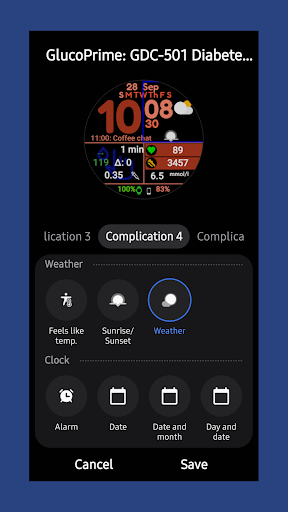
Complications used to achieve displayed faces
GlucoDataHandler
Complication 1: A. Glucose, delta and trend or B. Glucose, trend icon, delta and timestamp
Complication 2: IOB
Complication 3: Other unit
Complication 4: Weather (default service)
Complication 5: Phone battery level
Important Note: GlucoPrime is intended for informational use only. It is not a medical device and should not be used for diagnosis, treatment, or decision-making. Always consult your healthcare provider for medical guidance.
Privacy First: We do not track, store, or share your health data. Your information stays on your device.
Download GlucoPrime today and take control of your diabetes journey—one glance at a time.
Note to Google Review
Complications fields are intentionally limited to character counts that match the output of GlucoDataHandler for ease of display for users with limited vision.
Info Aplikasi
Rating dan Ulasan
I love this watch face. It has everything I need as a diabetic. LOVE IT! But....the ONLY thing I don't care for, and can't figure out is how to not display the finger point icon. I've selected *none* as a complication for both fields that are in that box, and it's still there. When I select 2 Complications to display there, it's still lurking in the background and muddies up anything I select to display in there. Is there a way to not display the blue finger? Lol... What am I missing. Plz reply.
not sure how to get it to display blood sugar...
So far this is the best face for me for CGM readings as it allows for a font size of the readings is large enough to read without squinting (or putting on my glasses). Also has just enough customization.
I think this is one of the best watch faces for a busy person with diabetes. It has everything I need.
This app doesn't work. it will install perfectly, however an option does not exist to add this app to your dexcom g7 or the g7 share app.
I love this watch face. Particularly in the Blue & Purple theme, and the dark mode. Thank you.


