

FitSport
Personalization
0.0
15 Unduhan
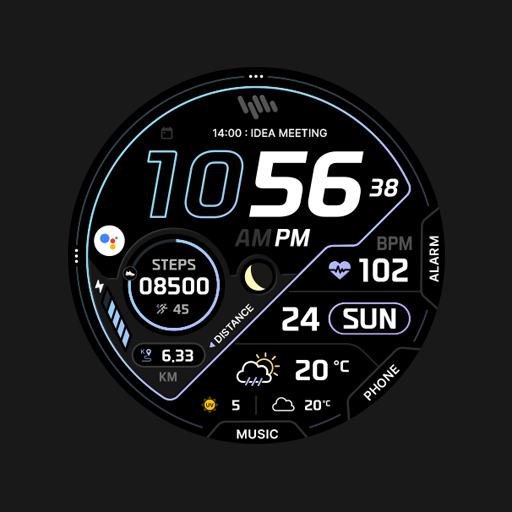
"Digital Sporty Watch Face"
Instal di Google Play
Aplikasi Berbayar


Tentang aplikasi ini
INSTALLATION:
1. Please make sure you watch is connected to your phone via Bluetooth
2. You can also install this watch face by accessing the Google Play Store in the web browser in a PC or Laptop with the same account you made the purchase from to avoid double charge.
3. If PC/laptop not available, you can use the phone web browser. Head over to the Play Store app, then to the watch face. Click the 3 dots in the upper right hand corner then Share. Use the available browser, I suggest Samsung Internet app, login the account you made the purchase from and install it there.
4. You can also check the Samsung Developers video installing Wear OS watch face in so many ways: https://youtu.be/vMM4Q2-rqoM
Our watch face apps are thoroughly tested in a real device (Galaxy Watch 4 Classic) and are reviewed and approved by the Google Play Store team before publishing them. We love to share our work and make sure users will enjoy our watch faces.
FEATURES:
- Digital clock switchable to 24h/12h via Phone Settings
- Alarm and Calendar Shorcuts
- 6 Editable Complications
- 1 Special Complication for your Step Goals
- 4 Color choices
Please enjoy!
CUSTOMIZATION:
1. Press and hold display then hit "Customize".
2. Swipe left and right to choose what to customize.
3. Swipe up and down to choose options available.
4. Hit "OK".
Note:
If Heart Rate is 0, you probably missed the Allow permission
in the first installation. Please try solutions below:
1. Please do this two (2) times - switch to another watch face and switch back to this face to enable the permission
2. You can also enable permissions in the Settings> Apps> Permission> find this watch face.
3. Also this can be triggered by a single tap to measure the heart rate. Some of my watch faces are still in Manual Refresh
Check out RAJ CoLab updates at:
Facebook page: https://www.facebook.com/RAJCoLab/
Developer page:
For support and request, you can email me at [email protected]
1. Please make sure you watch is connected to your phone via Bluetooth
2. You can also install this watch face by accessing the Google Play Store in the web browser in a PC or Laptop with the same account you made the purchase from to avoid double charge.
3. If PC/laptop not available, you can use the phone web browser. Head over to the Play Store app, then to the watch face. Click the 3 dots in the upper right hand corner then Share. Use the available browser, I suggest Samsung Internet app, login the account you made the purchase from and install it there.
4. You can also check the Samsung Developers video installing Wear OS watch face in so many ways: https://youtu.be/vMM4Q2-rqoM
Our watch face apps are thoroughly tested in a real device (Galaxy Watch 4 Classic) and are reviewed and approved by the Google Play Store team before publishing them. We love to share our work and make sure users will enjoy our watch faces.
FEATURES:
- Digital clock switchable to 24h/12h via Phone Settings
- Alarm and Calendar Shorcuts
- 6 Editable Complications
- 1 Special Complication for your Step Goals
- 4 Color choices
Please enjoy!
CUSTOMIZATION:
1. Press and hold display then hit "Customize".
2. Swipe left and right to choose what to customize.
3. Swipe up and down to choose options available.
4. Hit "OK".
Note:
If Heart Rate is 0, you probably missed the Allow permission
in the first installation. Please try solutions below:
1. Please do this two (2) times - switch to another watch face and switch back to this face to enable the permission
2. You can also enable permissions in the Settings> Apps> Permission> find this watch face.
3. Also this can be triggered by a single tap to measure the heart rate. Some of my watch faces are still in Manual Refresh
Check out RAJ CoLab updates at:
Facebook page: https://www.facebook.com/RAJCoLab/
Developer page:
For support and request, you can email me at [email protected]
Info Aplikasi
Versi
Diperbarui pada
N/A
Ukuran
Membutuhkan Android
ID Paket
com.rajcolab.FitSport
Instalasi
15
Kategori
Personalization
Izin Aplikasi
-
Wearable sensors/Activity data
- body sensors (like heart rate monitors)
-
Other
- control vibration
- prevent device from sleeping
- set an alarm


Aplikasi Serupa

SD74
Speedydesign
0.0

SD108
Speedydesign
0.0

MD268 Digital watch face
Matteo Dini MD ® Watch Faces
0.0

SamWatch Digital I 2026
Samtree
0.0

Digital Berulyk Watch Face
CERBER WATCH FACE
0.0
SamWatch PointColor 35 2024
Samtree
0.0
Lainnya dari pengembang

ArrowFlow
Titanium Cyborg Systems (TCS) Services
0.0

Fit Fun
Titanium Cyborg Systems (TCS) Services
0.0

Mystic Moon
Titanium Cyborg Systems (TCS) Services
0.0

3 Body Problem
Titanium Cyborg Systems (TCS) Services
0.0

Skinny
Titanium Cyborg Systems (TCS) Services
0.0

EV Dash
Titanium Cyborg Systems (TCS) Services
0.0