

Planet in stars Watch Face
Personalization


Tentang aplikasi ini
Introduction
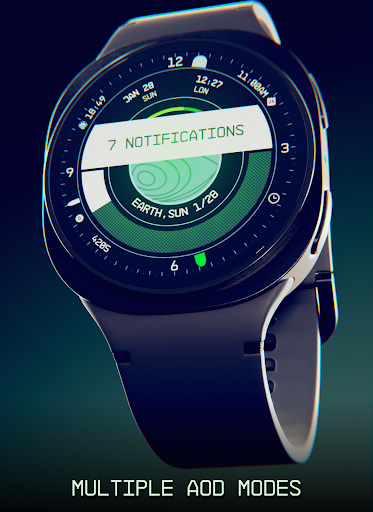
This is a native, standalone Wear OS watch face. This means that it can be installed on many smartwatches running this OS (like Samsung, Mobvoi Ticwatch, Fossil, Oppo, the latest Xiaomi and more).
It is completely handcrafted, to be unique.
Features
The watch face includes:
◉ 30 color palettes
◉ Many different customizations (9MLN possibilities!)
◉ 12/24 hours format support
◉ A lot of information at a glance
◉ Customizable UI, hands, circle, main bar, AOD and foreground effects
◉ Clean, futuristic and NASA punk style
◉ Planet details while charging, low battery / notification status alert!
◉ 5 customizable complications, of different sizes!
◉ Easy to use (and uninstallable) companion app
Installation
The installation is straightforward, don't worry!
Here's the procedure and a quick Q&A:
◉ Install this app in your smartphone
◉ Open it, and connect your Wear OS smartwatch to your device
◉ If the watch is connected, you will be able to tap the "view and install on smartwatch" button. (if not, refer to the Q&A below)
◉ Check your watch, you should see my watch face and the install button (if you see the price instead, refer to the Q&A below)
◉ Install it in your smartwatch
◉ Long press on your current watch face
◉ Swipe left until you see a "+" button, tap on it
◉ Look for the new watch face, tap on it
◉ Done. If you want, you can uninstall the companion app now!
Q&A
Q - I'm being charged twice! / The watch is asking me to pay again / you're a [derogatory adjective]
A - Keep calm. This happens when the account you’re using on the smartphone is different from the account used on the smartwatch. You have to use the same account (else, Google has no way to know that you already bought the watch face).
Q - I can't press the button in the companion app but my smartwatch is connected, why?
A - Most probably, you're using an incompatible device, like an old Samsung smartwatch or any other non-Wear OS smartwatch/smartband. You can easily check on Google if your device runs Wear OS before installling any watch face. If you're sure you have a Wear OS device and still you can't press the button, open the Play Store on your watch and search for my watch face manually!
Q - I have a Wear OS device, but it's not working! I'm gonna leave a one star review 😏
A - Stop right there! Most definitely there's an issue on your side while following the procedure, so please just send me an email (i usually reply during the weekends) and don't damage me with a bad and misleading review!
Q - The [name of a feature] is not working!
A - Try setting another watch face and then set mine again, or try allowing the permissions manually (on the watch obviously). If it still doesn't work, there's an handy "email button" in the companion app!
Support
If you need help or you have a suggestion, feel free to send me an email, I'll do my best to help.
I usually reply during the weekend because I'm just one person (not a company) and I have a job, so be patient!
This app is supported and updated to fix bugs and add new features. The overall design won't change, but it will surely be improved over time!
I know that the price isn't the lowest, but I worked a lot of hours on each watch face and the price also includes the support and the updates, if you think about it. And i assure you, I'll invest any earning on useful things and to help my family. Oh, and thanks for reading the full description! Nobody does it!
Info Aplikasi
Apa yang Baru
Izin Aplikasi
-
Other
- reorder running apps
- control vibration
- prevent device from sleeping
- set an alarm

Rating dan Ulasan
Exactly what I was looking for
great watch face with lots of customisation options only problem I found is when setting the heart rate to complication 3 the actual heart rate is not displayed only a heart icon
Disappointing. Can't turn off the "compass" feature and the face has a negative impact on battery life for my pixel watch 4. While there are many customization options, the majority of the aesthetic options look bad, such as adding cracks or burnout effects to the screen. Some options seem cool, but in practice make the small font complications totally illegible (such as the various filters, including CRT).
Good layout and customizability compared to other similarly themed faces. However, the permanent "Low Battery" banner covers up the time and the "hide notification banner" setting on the customization options doesn't affect it. If there was an option to remove that Low Battery banner, it'd be 5*'s
LOVE THIS. Even without the reference,this watch face is great. If you're still reading these reviews, is there a way to turn off the date right under the time in the center(where it says Ex: SEP 4)? I like having the locaton switched to date so it's odd me having it twice lol. Thanks!!
cannot set settings crashes when I go to customize refund please
Aplikasi Serupa

HMK WD066

ORB-28 Go-Global

Colorful Sporty Modern

Division Watchface

Torus Earth ZKin Watch

N-SPORT94 Weather Watch Face
Lainnya dari pengembang

Starry Night Depth Watch Face

Animated Tech Spark Watch Face

Atomic Tic Watch Face

Present Line Watch Face

Jet HUD Watch Face
