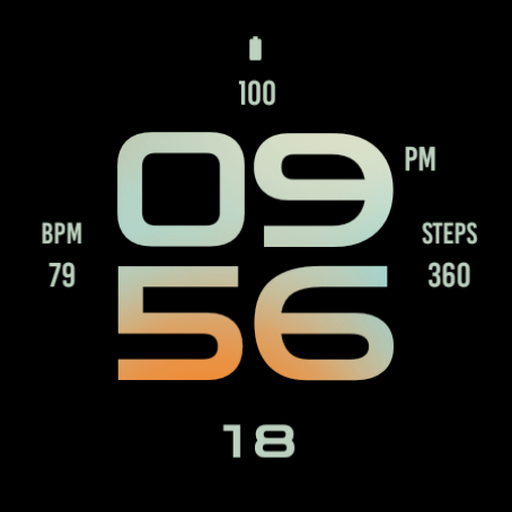
Digital Black Watch Face
Personalization
0.0
423 Unduhan
"Modern and minimal digital watch face for Wear OS"
Instal di Google Play
Aplikasi Berbayar


Tentang aplikasi ini
Digital Black Watch Face for Wear OS, beautiful modern digital watch face made with minimal design and focus on usability.
Main Features:
- Easy to read digital time display
- 12/24 hours mode based on device settings
- AM/PM marker
- Battery level status
- Date
- Customizable widget complications: Add steps, heart rate, weather, and more.
- Customizable app shortcut
- Always on display mode for low-power visibility
- Built for Wear OS smartwatches
Custom Widget Complications:
- SHORT_TEXT complication
- SMALL_IMAGE complication
- ICON complication
Installation:
- Make sure the watch device is connected to the phone
- On the Play Store, select your watch device from the install drop-down button. Then tap install.
- After a few minutes the watch face will installed on your watch device
- Alternatively, you can install the watch face directly from on-watch Play Store by searching this watch face name between quotation marks.
Note:
Widget complications shown in the application description are for promotional only. Custom widget complications data depends on your installed applications and watch manufacturer software. The companion app is only to make it easier to find and install the watch face on your Wear OS watch device.
Main Features:
- Easy to read digital time display
- 12/24 hours mode based on device settings
- AM/PM marker
- Battery level status
- Date
- Customizable widget complications: Add steps, heart rate, weather, and more.
- Customizable app shortcut
- Always on display mode for low-power visibility
- Built for Wear OS smartwatches
Custom Widget Complications:
- SHORT_TEXT complication
- SMALL_IMAGE complication
- ICON complication
Installation:
- Make sure the watch device is connected to the phone
- On the Play Store, select your watch device from the install drop-down button. Then tap install.
- After a few minutes the watch face will installed on your watch device
- Alternatively, you can install the watch face directly from on-watch Play Store by searching this watch face name between quotation marks.
Note:
Widget complications shown in the application description are for promotional only. Custom widget complications data depends on your installed applications and watch manufacturer software. The companion app is only to make it easier to find and install the watch face on your Wear OS watch device.
Info Aplikasi
Izin Aplikasi
-
Other
- Google Play license check

Rating dan Ulasan
0.0
Total rating
5
4
3
2
1
B
Ben Paradise
Nov 24, 2021
Best simplistic design I've encountered so far. Red theme gives oneplus vibes, love that. A bit more expensive than the other watch faces, but the design is worth it. Would love to know what the outer circle indicates.
F
Frederick Lyimo
Oct 29, 2021
TicWatch Pro 3 GPS Tapped the heart rate widget nothing happen. Maybe you can fix this in the future updates.
N
Nicholas B
Oct 15, 2021
Widgets are not actually customisable. You can change what happens when you tap them but not what information you see
E
Elias D.
Sep 13, 2021
For galaxy watch classic 46mm it works as expected.