

Hearing Sound Amplifier
Tools
4.6
887.7K+ Download
"Amplify nearby sound with volume controls, a live visualizer, and headphones."




Info su questa app
What is Hearing Sound Amplifier?
This Android listening tool processes sound from your phone’s microphone and plays it through connected headphones. It is designed to make nearby speech, television audio, presentations, and environmental sounds easier to follow by giving you direct control over the listening level.
The app provides live sound amplification and, according to the supplied listing, does not save recordings. Use it openly, with respect for other people’s privacy and any rules that apply in the location where you use it.
Who is Hearing Sound Amplifier for?
The app is for people who want a simple way to adjust nearby audio during everyday activities. It may help when following a permitted lecture or presentation, listening to a television from another part of the room, focusing on a conversation in a noisy setting, or exploring ambient sound outdoors.
It can also be useful for testing how microphone placement, headphone choice, and volume settings affect what you hear. The app is not a replacement for a medical hearing device and should not be used to diagnose or treat hearing loss.
What does Hearing Sound Amplifier do?
The app offers a focused set of live listening controls:
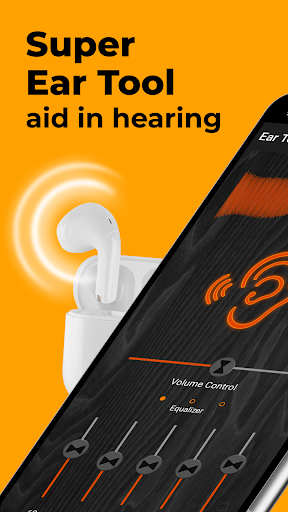
• Amplifies sound captured by the phone’s microphone in real time.
• Plays processed audio through wired or compatible Bluetooth headphones.
• Provides on-screen and device-volume controls for adjusting output.
• Shows a visual sound-intensity display to help you monitor input levels.
• Supports different listening situations by letting you reposition the phone near the permitted sound source.
• Is described in the supplied listing as working without an internet connection.
• Does not provide a recording feature according to the supplied listing.
Audio quality depends on the phone’s microphone, the distance and direction of the source, background noise, room acoustics, and the connected headset. Louder output does not necessarily mean clearer speech, so adjust the level and phone position gradually.
How does Hearing Sound Amplifier work?
Connect wired headphones or pair a compatible Bluetooth headset. Open the app, allow microphone access, and start the listening function. Place the phone safely near the sound source you are permitted to monitor. Use the app controls or device volume buttons to increase or decrease the output, and watch the visualizer while making adjustments.
Begin at a low volume to avoid sudden loud sound or feedback. If speech is difficult to follow, try moving the phone closer to the speaker, reducing surrounding noise, or changing the headset before increasing the level further. End the session when you no longer need amplification.
Compatibility and requirements
An Android phone or tablet with a functioning microphone and supported headphones is required. Bluetooth delay, audio routing, and volume range vary by device, headset, Android version, and manufacturer settings. Offline operation refers to the listening function described in the supplied listing; advertising or other app services may still require connectivity.
This app is not a medical hearing aid, hearing test, diagnostic product, or treatment. People with persistent hearing difficulty, pain, ringing, dizziness, or sudden hearing changes should consult a qualified healthcare professional. Use comfortable listening levels and respect consent, venue rules, and local privacy laws.
Hearing Sound Amplifier provides straightforward live microphone amplification, volume adjustment, and visual feedback for responsible everyday listening.
This Android listening tool processes sound from your phone’s microphone and plays it through connected headphones. It is designed to make nearby speech, television audio, presentations, and environmental sounds easier to follow by giving you direct control over the listening level.
The app provides live sound amplification and, according to the supplied listing, does not save recordings. Use it openly, with respect for other people’s privacy and any rules that apply in the location where you use it.
Who is Hearing Sound Amplifier for?
The app is for people who want a simple way to adjust nearby audio during everyday activities. It may help when following a permitted lecture or presentation, listening to a television from another part of the room, focusing on a conversation in a noisy setting, or exploring ambient sound outdoors.
It can also be useful for testing how microphone placement, headphone choice, and volume settings affect what you hear. The app is not a replacement for a medical hearing device and should not be used to diagnose or treat hearing loss.
What does Hearing Sound Amplifier do?
The app offers a focused set of live listening controls:
• Amplifies sound captured by the phone’s microphone in real time.
• Plays processed audio through wired or compatible Bluetooth headphones.
• Provides on-screen and device-volume controls for adjusting output.
• Shows a visual sound-intensity display to help you monitor input levels.
• Supports different listening situations by letting you reposition the phone near the permitted sound source.
• Is described in the supplied listing as working without an internet connection.
• Does not provide a recording feature according to the supplied listing.
Audio quality depends on the phone’s microphone, the distance and direction of the source, background noise, room acoustics, and the connected headset. Louder output does not necessarily mean clearer speech, so adjust the level and phone position gradually.
How does Hearing Sound Amplifier work?
Connect wired headphones or pair a compatible Bluetooth headset. Open the app, allow microphone access, and start the listening function. Place the phone safely near the sound source you are permitted to monitor. Use the app controls or device volume buttons to increase or decrease the output, and watch the visualizer while making adjustments.
Begin at a low volume to avoid sudden loud sound or feedback. If speech is difficult to follow, try moving the phone closer to the speaker, reducing surrounding noise, or changing the headset before increasing the level further. End the session when you no longer need amplification.
Compatibility and requirements
An Android phone or tablet with a functioning microphone and supported headphones is required. Bluetooth delay, audio routing, and volume range vary by device, headset, Android version, and manufacturer settings. Offline operation refers to the listening function described in the supplied listing; advertising or other app services may still require connectivity.
This app is not a medical hearing aid, hearing test, diagnostic product, or treatment. People with persistent hearing difficulty, pain, ringing, dizziness, or sudden hearing changes should consult a qualified healthcare professional. Use comfortable listening levels and respect consent, venue rules, and local privacy laws.
Hearing Sound Amplifier provides straightforward live microphone amplification, volume adjustment, and visual feedback for responsible everyday listening.
Info App
Versione
5.1.0
Aggiornato il
Nov 19, 2026
Dimensione
Richiede Android
6.0
ID pacchetto
com.agbtechnologies.supereartool
Installazioni
887.7K+
Categoria
Tools
Novità
Bug Fixes
Bluetooth Headphones Management
Equalizer Added
Audio Effects
More Controls
Minimal Size
Elegant Design
Enhanced Features
Better Performance
Latest Functionality
Bluetooth Headphones Management
Equalizer Added
Audio Effects
More Controls
Minimal Size
Elegant Design
Enhanced Features
Better Performance
Latest Functionality
Autorizzazioni app
-
Microphone
- record audio
-
Wi-Fi connection information
- view Wi-Fi connections
-
Other
- receive data from Internet
- view network connections
- full network access
- control vibration
- prevent device from sleeping
- Google Play license check


Valutazioni e recensioni
4.6
Valutazioni totali
5
4
3
2
1
M
Mohan Kumar
Nov 18, 2026
super hai 🥰🥰
�
கோ தனசேகரன்
Nov 18, 2026
paid aap 👎
r
rajat Karnwal
Nov 16, 2026
ertyuiop 📲📞🗣️🗣️🙏🙏🙏
I
Ivan Fadilla
Nov 05, 2026
good
K
KUMAR ARYA
Nov 05, 2026
nice 🙂
D
Dwayne Phillip
Oct 30, 2026
great 👍👍👍👍👍


