

Digi-Gears HD Watch Face
Personalization
4.0
44.4K+ Download
"Animated Watch Face Widget & Live Wallpaper Battery Date, Weather, Step Counter"




Info su questa app
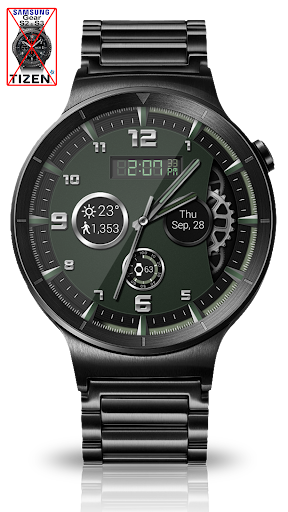
This completely customizable interactive HD Wear OS Watch Face, Clock Widget & Live Wallpaper brings a classic elegance to your wrist and Launcher. With animated gears that look real you will be sure to catch the eye of every onlooker! Features include custom complications, battery levels, weather conditions, step counter, color picker & date information. A settings app will also be installed on your mobile device to configure the watch face for any look you desire. Select any color and create a completely custom look for yourself! Don't have a Wear OS watch? No Problem! You can use the clock widget or Live Wallpaper on your launcher!
⭐ Compatible with all Wear OS watches including the new Samsung Galaxy Watch 4 & 5 Series! ⭐
❗ IMPORTANT ❗ - Not compatible with Samsung Watches that use Tizen or other smartwatches with other operating systems than Wear OS.
★Basic Features★
✔ Launcher Clock Widget (No animations or second hand due to battery consumption) (Mobile Only)
✔ Live Wallpaper (Mobile Only)
✔ Customizable digital & or analog clock
✔ Time zone selection
✔ Custom date format picker
✔ Smooth second hand
✔ 24-Hour
✔ Burn-In protection
✔ Square Compatible
★Premium Features★
✔ Animated (Only watch face - NOT Widget)
✔ Widget Frames
✔ Live Wallpaper (Animated)
✔ Custom Complications
✔ Screen Modes (Normal, Always Ambient, Always On)
✔ Screen on Time selection
✔ Interactive Actions (Currently unavailable on Samsung Watch 4/5)
✔ Ambient modes selector
✔ Color picker to select any color you like for the background, clock hands, text, & numbers
✔ Save personal color themes (long press to delete theme)
✔ Clock numbers toggle
✔ Watch battery status
✔ Phone battery status (When connected to an Android Phone)
✔ Current date
✔ Step Counter
✔ Weather conditions (Yahoo Weather & OpenWeatherMap) (When connected to an Android Phone)
★Translations★
✔ English
✔ Chinese
✔ Czech
✔ Dutch
✔ French
✔ German
✔ Italian
✔ Japanese
✔ Korean
✔ Russian
✔ Spanish
✔ Swedish
★How to install★
Watch Face - Once you have installed from the Play store, you may be asked to grant permissions to the app on your phone - be sure to approve all permissions. Once the app has installed on your phone, it may take 5-10 minutes to transfer over to you watch and the Wear OS app. Please be patient. Once installed, simply long press on your watch face to bring up the selection menu, or select this watchface from the Wear OS app. Use the accompanying settings app to configure the settings and options
Widget - Depending on what launcher you are using, you can either long press on your launcher to place a widget, or select this widget from the App Drawer -> Widgets list. Customize and change the widget settings with the accompanying App.
Live Wallpaper - Depending on what launcher you are using, you can either long press on your launcher to select your Wallpaper, or you can select the Live Wallpaper from the Settings App
If you have any problems at all, please send me an email before leaving a negative review - I will do my best to fix the issue as soon as possible.
★Trouble Shooting★
http://deniteappz.com/watchface/troubleshooting.html
Stay tuned for more watch faces to come!
⭐ Compatible with all Wear OS watches including the new Samsung Galaxy Watch 4 & 5 Series! ⭐
❗ IMPORTANT ❗ - Not compatible with Samsung Watches that use Tizen or other smartwatches with other operating systems than Wear OS.
★Basic Features★
✔ Launcher Clock Widget (No animations or second hand due to battery consumption) (Mobile Only)
✔ Live Wallpaper (Mobile Only)
✔ Customizable digital & or analog clock
✔ Time zone selection
✔ Custom date format picker
✔ Smooth second hand
✔ 24-Hour
✔ Burn-In protection
✔ Square Compatible
★Premium Features★
✔ Animated (Only watch face - NOT Widget)
✔ Widget Frames
✔ Live Wallpaper (Animated)
✔ Custom Complications
✔ Screen Modes (Normal, Always Ambient, Always On)
✔ Screen on Time selection
✔ Interactive Actions (Currently unavailable on Samsung Watch 4/5)
✔ Ambient modes selector
✔ Color picker to select any color you like for the background, clock hands, text, & numbers
✔ Save personal color themes (long press to delete theme)
✔ Clock numbers toggle
✔ Watch battery status
✔ Phone battery status (When connected to an Android Phone)
✔ Current date
✔ Step Counter
✔ Weather conditions (Yahoo Weather & OpenWeatherMap) (When connected to an Android Phone)
★Translations★
✔ English
✔ Chinese
✔ Czech
✔ Dutch
✔ French
✔ German
✔ Italian
✔ Japanese
✔ Korean
✔ Russian
✔ Spanish
✔ Swedish
★How to install★
Watch Face - Once you have installed from the Play store, you may be asked to grant permissions to the app on your phone - be sure to approve all permissions. Once the app has installed on your phone, it may take 5-10 minutes to transfer over to you watch and the Wear OS app. Please be patient. Once installed, simply long press on your watch face to bring up the selection menu, or select this watchface from the Wear OS app. Use the accompanying settings app to configure the settings and options
Widget - Depending on what launcher you are using, you can either long press on your launcher to place a widget, or select this widget from the App Drawer -> Widgets list. Customize and change the widget settings with the accompanying App.
Live Wallpaper - Depending on what launcher you are using, you can either long press on your launcher to select your Wallpaper, or you can select the Live Wallpaper from the Settings App
If you have any problems at all, please send me an email before leaving a negative review - I will do my best to fix the issue as soon as possible.
★Trouble Shooting★
http://deniteappz.com/watchface/troubleshooting.html
Stay tuned for more watch faces to come!
Info App
Versione
6.2.2
Aggiornato il
Nov 21, 2023
Dimensione
Richiede Android
6.0
ID pacchetto
com.denite.watchface.digigears
Installazioni
44.4K+
Categoria
Personalization
Novità
★6.2.2★
✔ Bug fixes
✔ Bug fixes
Autorizzazioni app
-
Location
- approximate location (network-based)
-
Other
- view network connections
- full network access
- run at startup
- set wallpaper
- control vibration
- prevent device from sleeping


Valutazioni e recensioni
4.0
Valutazioni totali
5
4
3
2
1
S
S.K. Goswami Ji
Mar 29, 2025
good
R
Riaan Potgieter
Jan 31, 2025
Cannot change anything. Moon stay even day time
O
Oishik Ray
Apr 19, 2024
Third class app
R
Roni Inbar
Apr 18, 2023
Very nice face
J
Jerry Pascal
Oct 02, 2022
Nice watch face I really like it
F
Felix M.
Sep 23, 2022
It was ok but added features don't go to watch