

Rogue Moon Phase Watch Face
Personalization



Info su questa app
Highlights:
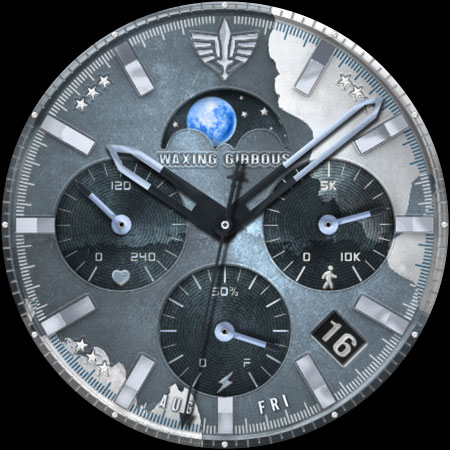
- Analog dial for time, heart rate, steps and battery information
- Bosom moon phase display plus text (moon phase type)
- Customization (dial background, index and dial hands colors)
- Month, day of the week and day display
- 4 preset app shortcut (heart rate, steps, battery and calendar and/or event)
- 7 custom shortcuts to access your favorite widget
- Always on display now 100% synced to your active color theme and can be dimmed down if you wish to save more battery (brightness options)
INSTALLATION:
1. Make sure your watch is connected to your smartphone and both are using the same GOOGLE account.
2. On Play Store App, use the drop-down menu and make sure your watch is selected as one of the targeted device for installation. The watch face will be installed on your watch.
3. After installation, or should you missed the notification that the watch face was installed, check the watch face list in your watch. How? --> follow these SIMPLE STEPS before you comment not working.
- Long press on your current watch face --> swipe from right to left until --> "Add watch face" (+/plus sign)
- Scroll down and look for "Downloaded" section - there you should see the newly installed watch face
- click on the watch face to activate it - and that's it!
SETTING UP SHORTCUTS/BUTTONS:
1. Press and hold the watch display.
2. Push the customize button.
3. Swipe from right to left until you reach the "complications".
4. The 6 shortcuts are highlighted. Click on it to set what you want.
CUSTOMIZATION OF DIAL STYLE e.g. BACKGROUND, INDEX ETC:
1. Press and hold watch display then hit "Customize".
2. Swipe left and right to choose what to customize.
E.g. Background, Index frame etc.
3. Swipe up and down to choose options available.
For bugs, suggestions and installation issue, please don't hesitate to contact me on my e-mail ([email protected]).
Thanks for your support and I look forward hearing from you though email, comments and ratings.
Info App
Novità
- Updated companion app
- Fixed companion app issue related to DEX code optimization
Autorizzazioni app
-
Other
- Google Play license check

Valutazioni e recensioni
cool looking watch face, but it has a black border on my watch style instead of going edge to edge. if they gets fixed will download again!
Talk about a battery drainer! Had it installed for 6 hours without AOD and drained 50% of the battery. Also when the watch has been idle (while on the wrist) you have to unlock it and reconnect to the phone. Very disappointed in this watch face. Samsung Watch 6 Classic.
this app kept freezing whenever you try to make any changes to the customisation setting. Uninstalled and will be requesting a refund Following a response from the developer, I reinstalled and tried again, but I had to keep doing a forced stop as it was taking 10+ minutes just to open customisation. It is a real shame as it is a really good looking watch face, but I don't have hours spare to make small changes to the appearance. Please refund the charge 😒
OMG😍 this watch face is the most elegant and beautiful watch face ever .The combination of colors is perfect and the design is amazing.... thanks for this wonderful WF 🌷
S tier. Classy


