

Colored Arc Text ZKin Watch
Personalization
0.0
1.4K+ Download
"The Watch supports running on Wear OS"
Installa su Google Play
App a pagamento




Info su questa app
The Watch supports running on Wear OS
🏠Other my works here:
https://play.google.com/store/apps/dev?id=9082617204511160070
Hope you leave a positive review for this watch!
【BOGO】Please send the following content to my email: [email protected]
[Order ID: GPA.××××-××××-××××-×××××
Name of the complimentary Watch:××]
I will send you free coupons within a week.
⌚️Instagram :
https://www.instagram.com/zkinwatchfaces?igsh=OHNuOHExbGliYWtm
🎁Telegram:
https://t.me/zkinwatch
The Watch supports running on Wear OS
Function Introduction:
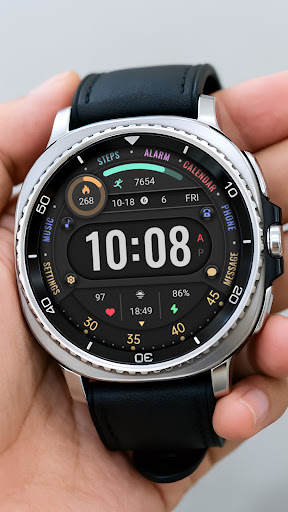
Top: Alarm Clock, Calendar, Steps and Progress Bar, Calories and Progress Bar
Central: Date, Week, Custom Data, Music, Settings, Time, Morning and Afternoon, Phone, Messages
Bottom: Heart rate, Battery, Second turntable
Customization: two customization areas are available for selection
Compatible devices: Galaxy Watch 4/5/6/7/8 and other devices that support Wear OS
How do I install the watch face on WearOS ?
1. Install it from Google Play Wear Store on your watch
2. Install the companion app for fully customization (Android phone devices)
🏠Other my works here:
https://play.google.com/store/apps/dev?id=9082617204511160070
Hope you leave a positive review for this watch!
【BOGO】Please send the following content to my email: [email protected]
[Order ID: GPA.××××-××××-××××-×××××
Name of the complimentary Watch:××]
I will send you free coupons within a week.
⌚️Instagram :
https://www.instagram.com/zkinwatchfaces?igsh=OHNuOHExbGliYWtm
🎁Telegram:
https://t.me/zkinwatch
The Watch supports running on Wear OS
Function Introduction:
Top: Alarm Clock, Calendar, Steps and Progress Bar, Calories and Progress Bar
Central: Date, Week, Custom Data, Music, Settings, Time, Morning and Afternoon, Phone, Messages
Bottom: Heart rate, Battery, Second turntable
Customization: two customization areas are available for selection
Compatible devices: Galaxy Watch 4/5/6/7/8 and other devices that support Wear OS
How do I install the watch face on WearOS ?
1. Install it from Google Play Wear Store on your watch
2. Install the companion app for fully customization (Android phone devices)
Info App
Versione
Aggiornato il
Sep 13, 2026
Dimensione
Richiede Android
ID pacchetto
com.watchfacestudio.ColoredArcText
Installazioni
1.4K+
Categoria
Personalization
Novità
Release a new watch companion to help quickly install watch face on mobile devices
Autorizzazioni app
-
Other
- Google Play license check

Valutazioni e recensioni
0.0
Valutazioni totali
5
4
3
2
1
M
Mike Menges
Apr 19, 2026
I've just downloaded it, but so far it works perfectly.
G
Grigorescu Ionut
Apr 16, 2026
Great experience with this one, congrats 👏


