RoFlouro
Personalization
4.3
832 Download
"Digital Smart Watch Face with clear & unique Design."
Installa su Google Play
App a pagamento


Info su questa app
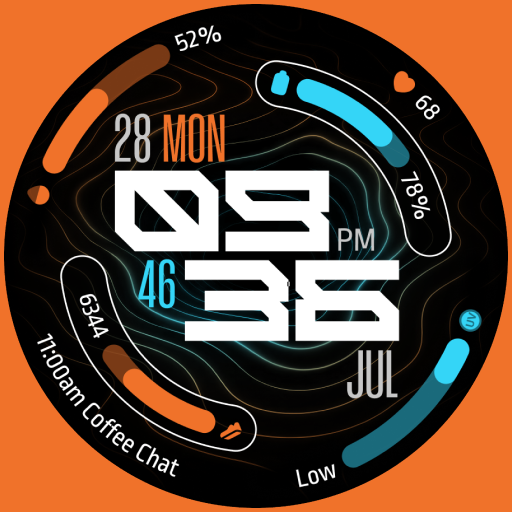
The "RoFlouro" is a digital Watch Face with clear & unique atractive design for Wear OS devices.
This watch face was designed using Watch Face Studio tool.
Note: If you see the digits font not showing correctly as it shown in the screenshots please uninstall the watch face, restart your watch, then install it again, this will fix the problem.
INSTALLATION:
1. Keep your watch connected to your phone.
2. Install in the watch. After installation, check your watch face list in your watch by pressing and hold display then swipe to the right end and click Add watch face. There you can see the newly installed watch face and just activate it.
3. After installation, you can also check the following:
I. For Samsung watches, check your Galaxy Wearable app in your phone (install it if not yet installed). Under Watch faces > Downloaded, there you can see the newly installed watch face and then just apply it to connected watch.
II. For other smartwatch brands, for other Wear OS devices, please check the watch app installed in your phone that comes with your smartwatch brand and find the newly installed watch face in the watch face gallery or list.
CUSTOMIZATION:
1. Press and hold display then hit "Customize".
2. Swipe left and right to choose what to customize.
3. Swipe up and down to choose options available.
4. Hit "OK".
FEATURES:
- Clear & unique atractive design.
- Time format (12H /24H) with Am/Pm.
- Full Date Details.
- Heart rate indicator.
- Digital steps counter.
- 2X custom complications.
- 12X color themes.
- Disable logo option.
- Weather conditions.
- Always on display.
For support and request, Do not hesitate emailing me at [email protected]
This watch face was designed using Watch Face Studio tool.
Note: If you see the digits font not showing correctly as it shown in the screenshots please uninstall the watch face, restart your watch, then install it again, this will fix the problem.
INSTALLATION:
1. Keep your watch connected to your phone.
2. Install in the watch. After installation, check your watch face list in your watch by pressing and hold display then swipe to the right end and click Add watch face. There you can see the newly installed watch face and just activate it.
3. After installation, you can also check the following:
I. For Samsung watches, check your Galaxy Wearable app in your phone (install it if not yet installed). Under Watch faces > Downloaded, there you can see the newly installed watch face and then just apply it to connected watch.
II. For other smartwatch brands, for other Wear OS devices, please check the watch app installed in your phone that comes with your smartwatch brand and find the newly installed watch face in the watch face gallery or list.
CUSTOMIZATION:
1. Press and hold display then hit "Customize".
2. Swipe left and right to choose what to customize.
3. Swipe up and down to choose options available.
4. Hit "OK".
FEATURES:
- Clear & unique atractive design.
- Time format (12H /24H) with Am/Pm.
- Full Date Details.
- Heart rate indicator.
- Digital steps counter.
- 2X custom complications.
- 12X color themes.
- Disable logo option.
- Weather conditions.
- Always on display.
For support and request, Do not hesitate emailing me at [email protected]
Info App
Versione
Aggiornato il
Aug 04, 2026
Dimensione
Richiede Android
ID pacchetto
com.watchfacestudio.RoFlouro
Installazioni
832
Categoria
Personalization
Valutazioni e recensioni
4.3
Valutazioni totali
5
4
3
2
1
T
Terry Heathcote
Oct 18, 2026
Really nice watch face with some great customisation options!
I
Ian Breen
Aug 27, 2026
Absolutely love this watchface! You have a very clean, and unique style.
1
1730N8
Jun 06, 2026
says it has to be authenticated not worth the trouble i paid for it and can't use it, probly just a scam
L
Lorenzo Schiavo
Jan 05, 2026
very elegant. however weather is not working when selected. also wish it would fill the screen more.
A
Amine
Jan 04, 2026
thanks i love it