

AE ARCTURIA
Personalization
0.0
305 Download
"Health activity watch face. Build with Watch Face Studio powered by Samsung."
Installa su Google Play
App a pagamento






Info su questa app
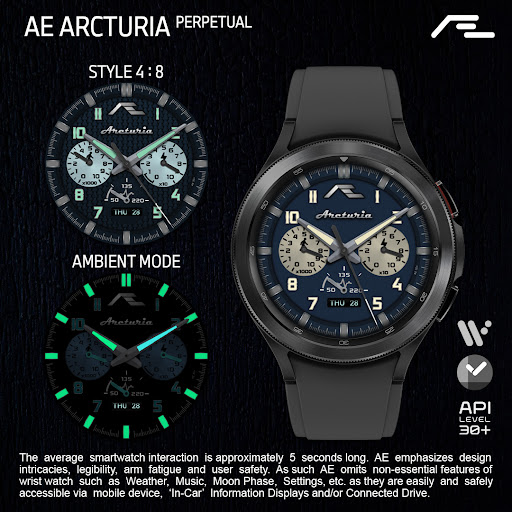
Tactical-styled sports activity watch face made for the professionals. Eight customizable luminosity and key activity information is integrated into Subdial, making it sand out as an all-occasion watch face. Complimented with AE’s signature ‘Always ON Display’ (AOD) with a striking luminosity.
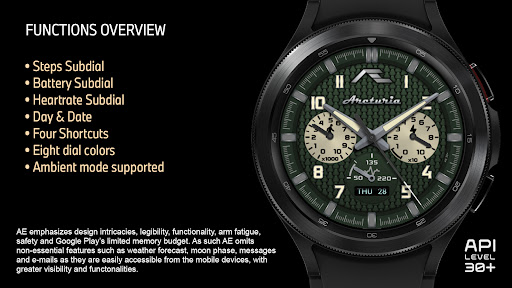
FUNCTIONS OVERVIEW
• Day and Date
• Heartrate Subdial
• Daily steps Subdial
• Battery status Subdial
• Eight dial luminosity
• Four shortcuts
• Super luminous Always ON display
PRESET SHORTCUTS
• Calendar (events)
• Alarm
• Message
• Refresh Heartrate Subdial*
• Dark mode
ABOUT THIS APP
This Wear OS app is built with Watch Face Studio powered by Samsung with an API of 30+. All functions and features of this App have been tested on Galaxy Watch 4 and worked as intended. The same may not apply to other Wear OS devices. The app is subject to change for quality and functional improvements.
During installation, allow access to sensor data on the watch. Paired with the phone app, place the watch firmly on the wrist and wait a moment for the app to initialize the Heartrate, or double tap the shortcut and give it a moment for the watch to measure. Kindly refer to the ‘Features’ screenshot to identify shortcut locations.
FUNCTIONS OVERVIEW
• Day and Date
• Heartrate Subdial
• Daily steps Subdial
• Battery status Subdial
• Eight dial luminosity
• Four shortcuts
• Super luminous Always ON display
PRESET SHORTCUTS
• Calendar (events)
• Alarm
• Message
• Refresh Heartrate Subdial*
• Dark mode
ABOUT THIS APP
This Wear OS app is built with Watch Face Studio powered by Samsung with an API of 30+. All functions and features of this App have been tested on Galaxy Watch 4 and worked as intended. The same may not apply to other Wear OS devices. The app is subject to change for quality and functional improvements.
During installation, allow access to sensor data on the watch. Paired with the phone app, place the watch firmly on the wrist and wait a moment for the app to initialize the Heartrate, or double tap the shortcut and give it a moment for the watch to measure. Kindly refer to the ‘Features’ screenshot to identify shortcut locations.
Info App
Versione
1.0.0
Aggiornato il
Jul 20, 2025
Dimensione
Richiede Android
ID pacchetto
com.watchfacestudio.arcturia05
Installazioni
305
Categoria
Personalization
Novità
This is Google Play’s periodic compulsory update for Wear OS apps to be compatible with upcoming Android version and to adhere to the ever-evolving Google Play Developer Program policies. This Wear OS app is now updated to target Android 14 (API level 34) pending future Android version upgrade. Note that some older devices / watches may be excluded with this update.


