
CELEST5441 Sport Watch
Personalization
0.0
216 Download
"Digital sport watch face with steps, heart rate, battery & 5 color variants."
Installa su Google Play
App a pagamento


Info su questa app
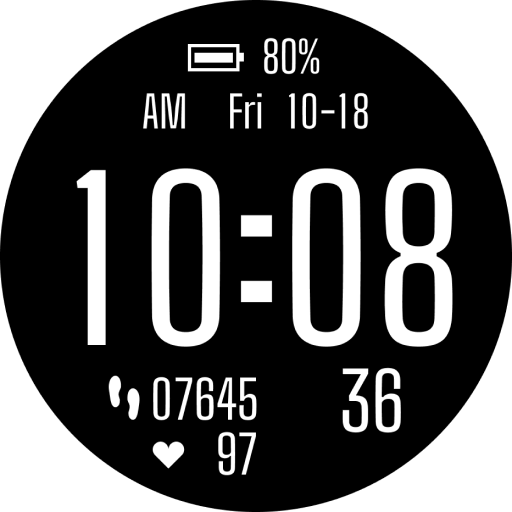
Digital and sized for a glance: CELEST5441 Sport Watch fills the middle of the dial with the time in bold condensed digits and puts everything else around the edges in the same clean face.
Battery sits at the top with its own icon, and AM/PM, weekday, and date share the line below it. Under the clock, a footprint icon marks the step count on the left and a heart marks your heart rate below it, with the seconds running large on the right. Icons instead of labels keeps the layout tight without making anything ambiguous. Five color variants are included: White, Red, Yellow, Blue, and Green.
🎮 Features
- Large digital clock in a bold condensed face
- Step count and heart rate with icon labels
- Battery percentage
- AM/PM, weekday, and date
- Large seconds display
🎨 Customization
- 5 color variants: White, Red, Yellow, Blue, Green
✅ Compatible Devices
- Google Pixel Watch/2/3/4/5
- OnePlus Watch 2/2R/3/4
- Oppo Watch X2/X3
- Samsung Galaxy Watch 4/4 Classic/5/5 Pro/6/6 Classic/7/8/8 Classic/9/FE/Ultra (2024)/(2025)/Ultra 2
- Xiaomi Watch 2/2 Pro/5
🎁 BOGO Promotion: https://celest-watches.com/bogo/
✨ Explore the complete CELEST collection in one place — including all Wear OS, HUAWEI, and Apple Watch faces, along with our apps and tools — with the CELEST Catalog app: https://play.google.com/store/apps/details?id=com.celestwatches.catalog
🔧 Installation Help
Having trouble? We've got you covered:
- Use the dropdown menu next to "Install" on your phone to select your watch model or install directly from your watch's Play Store app.
- Updating weather data (if the watch face shows weather) may take time after installation but switching to another watch face and switching back or restarting both the watch and phone usually helps.
- Check out our installation and troubleshooting guide: https://celest-watches.com/installation-troubleshooting/
- Contact us at [email protected] for quick support
📞 Support & Community
📧 Support: [email protected]
📱 Follow @celestwatches on Instagram and subscribe to our newsletter to get notified of new releases and deals: https://celest-watches.com/newsletter/
Battery sits at the top with its own icon, and AM/PM, weekday, and date share the line below it. Under the clock, a footprint icon marks the step count on the left and a heart marks your heart rate below it, with the seconds running large on the right. Icons instead of labels keeps the layout tight without making anything ambiguous. Five color variants are included: White, Red, Yellow, Blue, and Green.
🎮 Features
- Large digital clock in a bold condensed face
- Step count and heart rate with icon labels
- Battery percentage
- AM/PM, weekday, and date
- Large seconds display
🎨 Customization
- 5 color variants: White, Red, Yellow, Blue, Green
✅ Compatible Devices
- Google Pixel Watch/2/3/4/5
- OnePlus Watch 2/2R/3/4
- Oppo Watch X2/X3
- Samsung Galaxy Watch 4/4 Classic/5/5 Pro/6/6 Classic/7/8/8 Classic/9/FE/Ultra (2024)/(2025)/Ultra 2
- Xiaomi Watch 2/2 Pro/5
🎁 BOGO Promotion: https://celest-watches.com/bogo/
✨ Explore the complete CELEST collection in one place — including all Wear OS, HUAWEI, and Apple Watch faces, along with our apps and tools — with the CELEST Catalog app: https://play.google.com/store/apps/details?id=com.celestwatches.catalog
🔧 Installation Help
Having trouble? We've got you covered:
- Use the dropdown menu next to "Install" on your phone to select your watch model or install directly from your watch's Play Store app.
- Updating weather data (if the watch face shows weather) may take time after installation but switching to another watch face and switching back or restarting both the watch and phone usually helps.
- Check out our installation and troubleshooting guide: https://celest-watches.com/installation-troubleshooting/
- Contact us at [email protected] for quick support
📞 Support & Community
📧 Support: [email protected]
📱 Follow @celestwatches on Instagram and subscribe to our newsletter to get notified of new releases and deals: https://celest-watches.com/newsletter/
Info App
Versione
Aggiornato il
Aug 05, 2026
Dimensione
Richiede Android
ID pacchetto
com.watchfacestudio.celest5441
Installazioni
216
Categoria
Personalization
Novità
Updated to target Android 16 (API 36).
Autorizzazioni app
-
Other
- view network connections
- full network access


